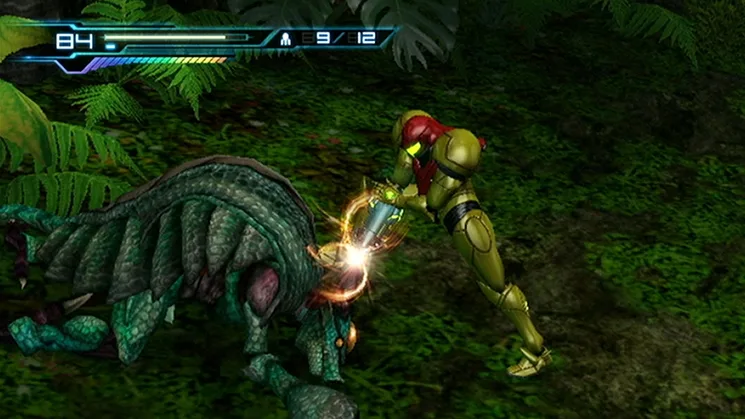
Metroid: Other M puts you back in the boots of bounty hunter Samus Aran, blending classic 2D exploration with a unique first-person perspective for combat. You’ll navigate the mysterious Bottle Ship, unraveling a story that delves into Samus’s past and her relationship with the Galactic Federation. Moment-to-moment gameplay involves exploring interconnected environments, acquiring new abilities, and engaging in intense firefights.
This guide is your essential companion for conquering the Bottle Ship. We’ll help you track down every Energy Tank, overcome challenging bosses like Arachnus, and master Samus’s combat abilities. If you’re aiming to achieve the best possible outcome or simply want to ensure you don’t miss any crucial upgrades on your journey through Sector 0 and beyond, this walkthrough has you covered.
Introduction [IN00]
Your friendly guide to starting Metroid: Other M! Learn about Normal Mode 100% completion, Hard Mode challenges, and Low% runs. Get ready to play!
Hey there! So, you're diving into Metroid: Other M? Awesome! This guide is here to help you tackle the game on Normal Mode, aiming for that sweet 100% item completion. Think of it as your personal roadmap, though feel free to explore and find your own cool tricks – this game’s pretty good at keeping you on its intended path, but who knows what you might discover!
A quick heads-up: skipping cutscenes won't actually shave time off your in-game clock. They add up to about an hour, and even if you skip 'em, that time still counts towards your completion percentage. But hey, finishing with 100% unlocks some cool concept art and even Hard Mode, so it's worth it!
Speaking of Hard Mode, it's a whole different beast. No extra energy tanks or missile expansions – you're stuck with your base stats. You'll likely get taken out in just one hit if you're not careful, as you only have 99 energy. Sadly, the latter half of the game isn't playable in Hard Mode. If you're quick and know what you're doing, you can blast through Hard Mode in about two hours of actual gameplay, not counting those cutscenes.
If Hard Mode's missing that final stretch, why not try a Low% run on Normal Mode? Just grab the absolute minimum items needed to progress. You'll have to pick up two Energy Tanks and one Missile Tank – that's about 3% completion. The Low% walkthrough covers that last section that Hard Mode skips.
One last thing: this guide is mostly spoiler-free. The only real spoilers are the names of the final four bosses. Other than that, the story details are kept under wraps. A lot of the info here comes from the community, so a big shout-out to everyone who contributed!
Controls [CN00]
Learn Metroid: Other M controls, including Normal View and First Person perspective, and when to use each.
There are two primary ways to hold the Wiimote in Metroid: Other M, each offering a different perspective:
- Horizontal Style: Hold the Wiimote horizontally, similar to playing Metroid on the Virtual Console or as shown on the initial screen. This mode presents the Normal View, which is the standard perspective where you see Samus and is used for general movement and standard combat.
- Vertical Style: Point the Wiimote directly at the screen. This activates Search View, offering a First Person perspective of your surroundings.
When to use Normal View:
- When moving around the room.
- When in standard combat.
- When in Morph Ball mode or to drop bombs.
When to use Search View:
- When firing missiles.
- When activating switches with the beam.
- When Samus needs to examine something.
- The Minus button is exclusively used for skipping cutscenes (scenes that play out automatically).
are unskippable. Cutscenes cannot be skipped until you finish the game once.
Learn about the unskippable cutscenes in Metroid: Other M. Discover why these cinematic moments cannot be skipped until you complete the game once.
- 1The game features unskippable cutscenes.
- 2These cutscenes must be viewed in their entirety.
- 3You cannot skip any cutscenes until you have completed the game at least once.
- Be prepared to watch all cutscenes on your first playthrough.
- Consider these moments as part of the story and character development.
- Once the game is completed, subsequent playthroughs may offer the option to skip some or all cutscenes (this is not explicitly stated in the source but is a common game mechanic).
Controls for Normal View [CN01]
Master Metroid: Other M normal view controls, including movement, firing, Morph Ball actions, and map display.
- 1Use the D-pad/Control Pad to move and perform Sense Move (see Special Actions).
- 2Press the A button to enter or exit Morph Ball mode.
- 3Use the 1 button to fire your beam, or hold it to charge the Charge Beam. Releasing the button fires the charged shot. Holding 1 while entering Search View retains the charge. In Morph Ball mode, the 1 button drops bombs or Power Bombs (hold until the Charge Gauge is full, then release). You can also perform a Five-Bomb Drop by holding 1 until the Charge Gauge is full, then morphing. In Morph Ball mode, the 1 button also performs a Morphing Charge Beam (hold until the Charge Gauge is full, then unmorph).
- 4Press the 2 button to jump. Holding the 2 button down allows for a higher jump. While pressing the D-pad, the 2 button performs a spin-jump. In Morph Ball mode, the 2 button performs a spring jump, which can be bounced by pressing 2 as you land.
- 5Press the Plus button to display the map screen.
- 6Press the Home button to display the HOME Menu.
- Jumping height is button sensitive; hold down the 2 button for a higher jump.
- You can retain a Charge Beam shot by holding 1 and entering Search View.
Similar guides you might like


100% Human-Written. AI Fact-Checked. Community Verified. Learn how AntMag verifies content