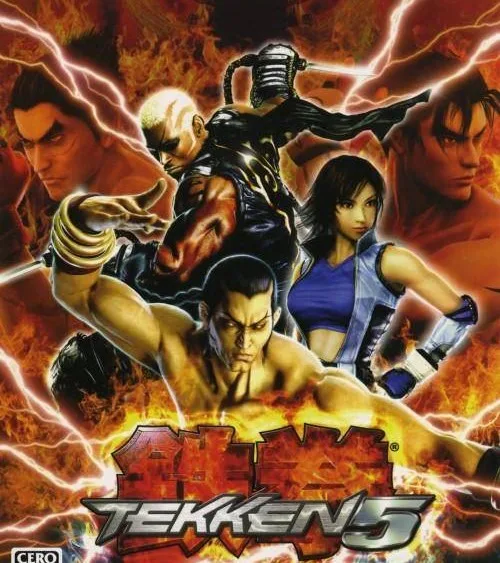
Welcome to Tekken 5, the PlayStation 2 fighting game where you master the iron fist. Developed by NAMCO and released in 2004, Tekken 5 offers a dark and balanced combat experience. You'll progress through a story mode, learning character archetypes and fighting styles as you go.
This guide is your key to conquering Tekken 5. We'll cover everything from fight money strategies to defeating every boss, including the formidable Jinpachi Mishima. Whether you're aiming to complete the story or master the game's mechanics, this guide provides the insights you need to succeed on the PlayStation 2.
Ia. WHY?
Dive into Tekken 5's mechanics and move names. This guide explains the reasoning behind the Japanese move names and their impact on understanding the game's deep combat system.
Hey there! So, you're diving into Tekken 5, huh? Awesome! It's a fantastic game, and I'm stoked to help you get a handle on it. You might be wondering why this guide is structured the way it is, or why we're focusing on certain aspects. Well, that's exactly what this section is all about – understanding the 'why' behind the madness of Tekken 5!
One of the biggest things I noticed when I first started playing Tekken 5 seriously was how different the American move names were compared to the Japanese ones. It can get super confusing when you're trying to talk strategy with other players or look up specific techniques. Some of those American names are just wild, right? Like, 'Three Ring Circus' or 'Laser Scraper' – they don't exactly scream 'deadly martial arts,' do they? The Japanese names often give you a much better sense of what the move actually does or its origin.
The Japanese players actually have a bit of an edge here. With a Tekken ID card, they can access Tekken-Net through their phones to check out official moves lists. It's a bummer we can't access it directly online, but it's a cool feature nonetheless. These official lists usually include frame data and all sorts of technical details that are super helpful for serious players.
Now, I know some of you might just want the raw moves lists, and that's totally fine! You'll find plenty of those around. But if you're like me and have a bit of an interest in Japanese culture or language, this guide will try to shed some light on that. My goal is to help you not only master the combos but also understand the nuances of the character names and move pronunciations. As a professional translator, I figured I could offer a unique perspective on this.
If all that sounds like too much and you just want the pure gameplay breakdown, no worries. You might be better off checking out other guides that focus solely on the mechanics. But remember, this game was made by Japanese developers, so understanding the Japanese names can really give you a deeper appreciation for the 'real' moves and their intended meaning. It’s all about getting the full Tekken 5 experience!
Ib. QUICK FAQ
Get answers to common Tekken 5 questions about character releases, name spellings, vocal tracks, ranking systems, and the meaning of 'Tekken'.
Q: Why aren't all the characters there?
A: Because they weren't all released at the time this was last updated. So far, we've yet to see if a final update with Jimpachi...I doubt he'll be there, but I'll leave it at that, just in case. There will be a separate FAQ for the home version, which I believe will have Jimpachi.
Q: Why is (so-and-so)'s name spelled weird?
A: Sorry; I tend to write things out strange. Since it's from Japanese generally, and it's not written in the Roman alphabet, there is no 100% correct way to write it out. For the sake of students of the Japanese language, I use sort-of a Hepburn-style of Romanization that shows which vowels are "elongated." That's why names like "Ganryuu" show up. Also, the letter "n" is pronounced like an "m" (sort of) in front of a "p" or "b" or "m." That's why I'll write words like "Jimpachi" when it's usually spelled out "Jinpachi." Confused? Well, sorry. I'll elaborate more in the section "How to Pro- nounce Japanese, Korean, and Chinese."
Q: Why aren't all the vocals in there?
A: The only arcade near me has the volume turned very, very low, and the rest of the arcade is noisier than a night club. Seriously, the times I've had the place to myself, the attract modes of the other games are so loud that I still have to press my ear to the speaker to hear anything. If anyone has samples of the entrance and victory poses, I'd certainly like to hear them.
Q: What does "Tekken" mean?
A: "Fists," especially "tightly-clenched fists." Literally, it means "iron fist," which is where the name of the tournaments comes from. However, "tekken" is a common expression in Japanese and is different from the "iron fist" that is used in English to mean "a strict reign."
Q: What are the Japanese ranking names for the cards?
A: At first, you're a "Nyuumonsei," a "beginner" or a newly-enrolled student. Then, you'll be promoted to "9th Kyuu" (just another word for "class" or "rank.") You'll then have to work your way up to 1st Kyuu, then you'll be "1st Dan." "Dan" is another word for "rank" or "class" or "grade." Go up to 5th Dan, and you may be promoted to "Shihan" ("instructor.") From there, you can be promoted to "Kaiden," which means "initiator" or "master." Then, "Kentatsu," "fist master." Then, "Kengou," or "fist hero." After that comes "Kensei," or "fist saint." Then, "Shuura," which is a shortened way of saying "Ashura," or Asura, a Buddhist deity of war. Then, "Fuujin," a god of storms, whose name means "Wind God," and then, "Raijin," another storm god whose name means "Thunder God." These are the two that the uppercuts used by the Mishimas and Jin are named after. After that is currently just a rumor, but I believe it will be "Shinken," or "Fist God," because that is the title Feng Wei aspires to, and possibly the source of Jimpachi's power.
Q: Your translations don't match the official Namco ones. Whassup with that?
A: They're my translations. Usually, I haven't even seen the American ones. If it turns out with different syntax, there is usually a reason. I usually try to convey things fairly close to the Japanese text, so if it turns out different, they've usually taken some liberties with the text.
Q: Why do you ramble so much?
A: As I said before, this FAQ isn't simply a moves list; I'm also attempting to shed some light on the language used in the game--particularly the Japanese (it is a Japanese game, after all). I must apologise to the Korean and Chinese audiences. I speak only a little of those languages, and so, if I don't do them justice, I am sorry. Then again, the Japanese makers of this game don't do them much justice, either (just look at what they've done to the Chinese names).
Q: I hate you and your lousy FAQ. Should I write you?
A: As always, I guess, if you really wanna tell me off, go ahead and mail me, but I probably won't respond. Also, if you keep mailing me, I might wonder why you bothered looking at the FAQ at all. Jeez, go outside and run around, or something. There are much better ways to spend your energy than sitting around and getting all bent out of shape that some guy wrote something about Jin that conflicts with your fanfic, or whatever.
Id-1. LEGEND
Learn to read Tekken 5 move lists and understand the game's notation system, including button inputs, directional commands, and move properties.
Alright, so you're diving into Tekken 5 and seeing all these crazy button combinations in move lists? Don't sweat it! This section is basically your cheat sheet to understanding exactly what your character can do and how to pull it off. Think of it like learning a secret language that unlocks all the cool moves.
We're going to break down all the symbols and abbreviations you'll see. Once you get this, reading any move list will be a piece of cake, and you'll be executing combos and special moves like a pro in no time. Let's get this legend decoded!
Notation Breakdown:
- Basic Buttons: 1 = Left Punch, 2 = Right Punch, 3 = Left Kick, 4 = Right Kick. Simple enough, right?
- Directions: These are pretty standard fighting game terms. Think of them like a mini-joystick input:
- N = Neutral (letting go of the stick)
- u = Up
- d = Down
- f = Forward (towards the opponent)
- b = Back (away from the opponent)
- Combinations like ub (up-back), uf (up-forward), db (down-back), df (down-forward) just mean you're hitting those diagonal directions.
- Holding Directions: When you see a capital letter like U, B, F, etc., it means you need to hold that direction. So, F means hold forward, DB means hold down-back.
- Combining Inputs:
- '+': Means press buttons at the same time. So, 1+2 means hit Left Punch and Right Punch together.
- ',': Means press buttons one after another, in sequence.
- '()': Means hold the button down.
- ':': This is the tricky one – it's a 'Just Frame' input. You have to press the second button at the *exact* moment the first button connects. We're talking milliseconds here, so it takes practice!
- '*', '#', '@', '?': These are just notes about new moves, changed commands, or uncertain official names. Don't worry too much about these for now.
- Move Properties: This tells you how the move behaves and how to defend against it.
- h = Hits High (can be ducked or blocked standing)
- m = Hits Mid (must be blocked standing)
- s = Special Mid (can be blocked standing or crouching – a bit of a mix-up!)
- l = Hits Low (must be blocked low)
- ! = Cannot be blocked (rare, but powerful!)
- Situational Commands: These apply only under specific conditions.
- ch = Counter Hit (the move lands while your opponent is attacking)
- fc = Fully Crouched (you're in a crouch state)
- wr = While Rising (as you're getting up from a crouch)
- ss = Side Step (moving sideways to dodge)
- bt = Back Turned (your back is to the opponent)
- Special Motions: These are common fighting game inputs.
- qct = Quarter Circle Towards (Down, Down-Forward, Forward)
- qcb = Quarter Circle Back (Down, Down-Back, Back)
- hct = Half Circle Towards (Back, Down-Back, Down, Down-Forward, Forward)
- hcb = Half Circle Back (Forward, Down-Forward, Down, Down-Back, Back)
- 360 = Spin the joystick a full circle.
- Other Notations:
- 'back', 'right side', 'left side': Refers to your position relative to the opponent.
- '_': Means you can do either the first option or the second.
- '^': Used for combo throws, indicating actions to be performed during a specific part of a sequence.
- Don't try to memorize everything at once! Focus on the basic buttons (1-4) and directions (u, d, f, b) first.
- When you're looking at a specific character's move list, pay attention to the property symbols (h, m, l, s) – they're crucial for knowing how to defend.
- Practice the special motions (qcf, qcb, etc.) in training mode. They become second nature with repetition.
- The 'Just Frame' (:) notation is for advanced players. Don't get discouraged if you can't nail it immediately; focus on the core inputs first.
- Keep this legend handy while you're playing. It's your best friend when you're trying to figure out a new move or combo.
Id-2. HOW TO FIND IT
Learn how to use the Find feature in Tekken 5 FAQs to quickly locate specific sections and character names by matching case.
To locate a specific section within the Tekken 5 FAQ, utilize the 'Find' feature. This function is typically located within the 'Edit' menu of your application.
To use the 'Find' feature, type the text you wish to locate into the search bar. For instance, if you are trying to find information on a particular character, search for their name written in all capital letters. Ensure that the 'match case' option is selected for precise results. This method also works for finding any subsection, as they are also written in all capital letters.
- Section headings and subsection titles are written in all caps for easy searching.
- Use the 'match case' option in the 'Find' feature for more accurate searches.
- The 'Find' feature is typically accessed through the 'Edit' menu.
Similar guides you might like


100% Human-Written. AI Fact-Checked. Community Verified. Learn how AntMag verifies content