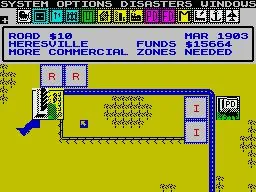
Navigate SimCity's top red bar options menu. Learn about Game Speed, Auto-Options, Disaster settings, and detailed City Information Maps.
At the top of the screen, a red-bordered bar contains six icons providing access to your city's information and settings. These are, from left to right: Game Speed, Options, Disasters, Windows (Information), Evaluation, and Exit.
Game Speed (Clock Icon): Controls the passage of time in your city. Options include High, Medium, Slow, and Sleep (which pauses time effectively). The visual representation changes from running to walking to sleeping.
Option (Hand Pressing Button Icon): Toggles various automated features.
- Auto-Bulldozer: ON by default. Allows building over obstructions like Parks, Trees, Power Lines, and Rubble.
- Auto-Budget: OFF by default. If ON, you bypass the end-of-year fiscal statement. (Note: This feature is reportedly broken in the NES prototype).
- Auto-Go To: OFF by default. If ON, the game will alert you to heavy traffic congestion or disasters (including exploding buildings).
- Background Music (B.G.M.): ON by default. Controls the in-game music. Turn OFF for silence.
Disasters: Enables various catastrophic events. Choices include Fire, Flood(s), Air Crash, Tornado, Earthquake, and Monster (Bowser) Attack.
Windows (Information) (Island with City Grid Icon): Accesses detailed city statistics and maps. This menu has six icons:
- Exit (Arrow Pointing Off-Screen): Returns you to the main game screen.
- Maps (Map) (Island Icon): Displays various city statistics. Options include:
- City Map (Comprehensive): Shows zones (Residential, Commercial, Industrial) with density indicators.
- Power Grid (Power Line Poles Icon): Displays power distribution. Red indicates full coverage; blue indicates areas without power.
- Population Map (Two People Icon): Shows population density (blue to red scale) and rate of growth (green for decline, red for aggressive growth).
- Traffic Density (Car Icon): Highlights areas of traffic congestion using a blue to red scale.
- Pollution (Building with Smoke Stacks Icon): Identifies polluted areas using a blue to red scale.
- Crime Rate (Gun and Knife Icon): Shows areas with high crime rates using a blue to red scale.
- Land Value (Moneybag Icon): Displays the worth of different city areas using a blue to red scale.
- Department Stats (Municipal Building Icon): Provides coverage maps for Police and Fire Departments, using a blue to red scale for coverage levels.
Note: Time continues to pass while viewing information in the Windows menu, except when a Dr. Wright message is triggered, which pauses time until you exit the screen.
Evaluation (Voice) (Two People Raising Hands Icon): Leads to a bulletin board displaying information, likely related to city performance or ratings.
100% Human-Written. AI Fact-Checked. Community Verified. Learn how AntMag verifies content