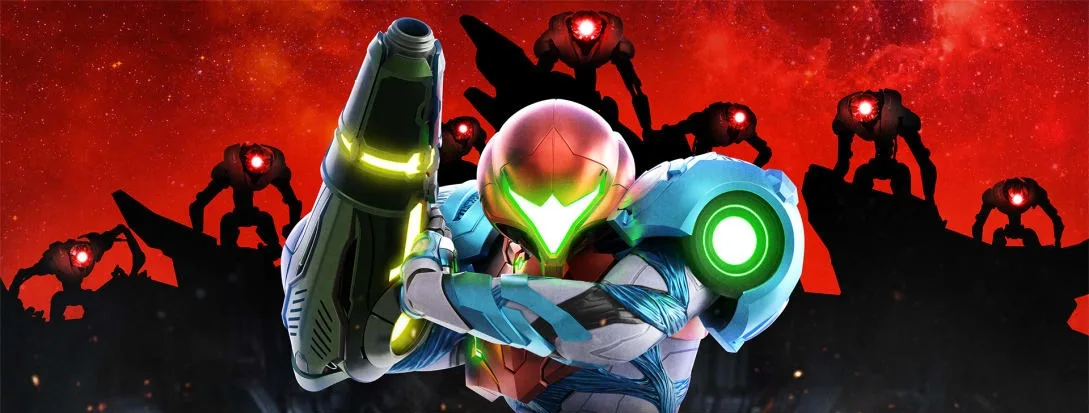
Metroid Dread plunges you into the role of bounty hunter Samus Aran, stranded on the hostile planet ZDR. As you explore its labyrinthine environments, you'll engage in challenging combat, master new abilities, and constantly evade the relentless pursuit of the terrifying E.M.M.I. robots. This installment picks up after the events of Metroid Fusion, tasking you with investigating the potential resurgence of the dangerous X Parasite.
This guide is your essential companion for conquering ZDR. We'll provide a complete walkthrough from your initial awakening to the final confrontation, offering expert strategies for every boss fight, including those E.M.M.I. encounters. You'll also find the precise locations for all Missile Tanks, Energy Tanks, and crucial weapon upgrades, ensuring you don't miss any vital equipment needed to survive.
Guide and Walkthrough (NS) by GfaqCodebreak
Metroid Dread Table of Contents: Explore walkthrough sections for Artaria, Cataris, Dairon, Burenia, Elun, Ferenia, Ghavoran, Hanubia, Itorash, and more.
Walkthrough Sections:
- Artaria
- Cataris
- Dairon
- Burenia
- Elun
- Ferenia
- Ghavoran
- Hanubia
- Itorash
Collectibles:
- Missile Tanks
- Missile Tank (+)
- Energy Tanks
- Energy Parts
Other Sections:
- Controls
- Map
- Items
- Boss Battles
- Story Analysis
- Speed Run
- Sequence Breaks
- Enemy Data
- Classic Metroid (including Bosses and Equipment)
- Super Metroid
- Metroid Fusion
- Videos
- Comments and Responses
- Legal Information
Map
Navigate Planet ZDR with ease! This guide breaks down all Metroid Dread map icons, from Power Beam Doors and Network Stations to Missile Tanks and Shuttles.
The map feature in Metroid Dread can be confusing due to its many icons and colors. This guide covers key map elements to help players understand their meaning and function.
Here is a breakdown of the various map icons:
| Icon | Object | Description |
|---|---|---|
| Power Beam Doors | Blas these open with a single power beam shot. | |
| Network Stations | Communicate With Adam, Save Game. | |
| Map Stations | Reveals the map for the current area that Samus is located in. | |
| Save Stations | Players can save their game here. | |
| Total Recharge Stations | Refills all health and all ammunition. | |
| Missile Tanks | Increases Missile Capacity x2. | |
| Interactive Devices | Various types of objects that can be interacted with for an effect on the planet ZDR. | |
| Energy Recharge Stations | Refills all of Samus Aran's Health. | |
| Shutter Doors | Use the Phantom Cloak to proceed through the shutters. | |
| Shuttle/Travel Station | Shuttles will take Samus Aran to other locations on Planet ZDR. | |
Power Beam Doors
These are the most basic doors in the game. They are yellow with a large yellow circle in the middle and can be opened with a single power beam shot. On the mini-map, they resemble the icon shown.
Network Stations
At a Network Station, Samus can plug into the network with her Arm Cannon to receive hints, lore, or story information from Adam. Players can also save their game here.
Total Recharge Stations
These Chozo Statues, identified by a golden glow and a gold Chozo representation on the map, fully recharge both ammunition and health when Samus steps on the plate in front of them.
Missile Tank Markers
These markers indicate the location of Missile Tanks, which increase Missile Capacity by two. They appear on the World Map with a red circle outline, similar to the icon shown.
Interactive Devices
These devices, marked by a Hand Icon on the world map, can trigger various effects on Planet ZDR, such as lowering water levels or changing temperatures. They are crucial for main game progression.
Energy Recharge Stations
These stations glow purple and instantly restore all of Samus Aran's health and energy tanks. They rarely offer checkpoints and do not allow for saving the game.
Shutter Doors
To pass through Shutter Doors, Samus must use the Phantom Cloak. Be mindful of Aeion Energy levels, as depleting them will result in losing energy tanks.
Shuttles
Shuttles facilitate travel between different locations on Planet ZDR. The first encountered shuttle in Cataris transports Samus to Dairon, with more available for other destinations later in the game.
Guide and Walkthrough (NS) by GfaqCodebreak (2)
Metroid Dread GameFAQs guide and walkthrough covering Artaria, Cataris, Dairon, Burenia, Elun, Ferenia, Ghavoran, Hanubia, and Itorash.
- 1Navigate the Introduction section.
- 2Access the GameFAQs specific content.
- 3Review the Controls.
- 4Consult the Map.
- 5Follow the detailed Walkthrough for each region: Artaria, Cataris, Dairon, Burenia, Elun, Ferenia, Ghavoran, Hanubia, and Itorash.
- 6Identify and collect all Items.
- 7Prepare for and defeat Boss Battles.
- 8Achieve 100% Collectibles, including Missile Tanks, Missile Tanks (+), Energy Tanks, and Energy Parts.
- 9Analyze the Story.
- 10Utilize Speed Run strategies.
- 11Explore Sequence Breaks.
- 12Consult Enemy Data.
- 13Refer to Classic Metroid sections, including Super Metroid Bosses and Super Metroid Equipment.
- 14Review Metroid Fusion information.
- 15Watch Videos.
- 16Read Comments and Responses.
- 17Review Legal Information.
- The guide is updated to version 1.04 as of 04/26/2026.
- This section is a continuation from the Introduction and precedes the Controls section.
- The walkthrough covers all major areas of the game.
- Specific sections are dedicated to collectibles and boss encounters.
GameFAQs
Metroid Dread GameFAQs section covering Omega Cannon aiming and EMMI strategies. Includes introduction and controls.
- 1Aiming the Omega Cannon can be challenging; practice is key to improving.
- 2For rookie players, defeating an EMMI often requires maintaining a good distance and setting up your attack effectively.
- 3A video demonstrating how to take out EMMI 02 is available, showing the necessary setup.
- Focus on maintaining a good distance from the EMMI.
- Ensure you have a proper setup before engaging the EMMI.
- Practice makes perfect when aiming the Omega Cannon.
Navigation:
- Previous: Introduction
- Next: Controls
Similar guides you might like

100% Human-Written. AI Fact-Checked. Community Verified. Learn how AntMag verifies content