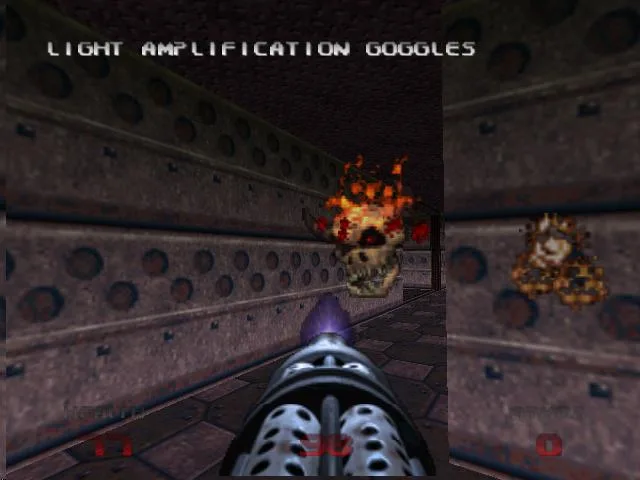
Welcome to Doom 64, a chilling sci-fi horror FPS where you, the Doom Marine, are tasked with clearing the desolate Martian moons of demonic forces. You'll navigate claustrophobic corridors and expansive alien landscapes, blasting through hordes of classic Doom enemies with an arsenal of iconic weapons. It's a pure, distilled dose of classic Doom action with a darker, more atmospheric tone.
This guide is your essential companion for conquering the Mother Demon and her legions. We'll cover every objective across all missions, detail enemy weaknesses, highlight secret areas, and provide strategies for taking down tough bosses. Whether you're aiming to master weapon usage, find every hidden collectible, or simply survive the onslaught, this guide has you covered.
1. Enemies
Learn about enemy appearances in Doom 64, including secret levels like Outpost Omega and The Lair.
Some enemies in Doom 64 first appear in secret levels, which are accessed by taking all secret exits within preceding levels. The following secret levels are available:
- Level 29: Outpost Omega (accessed from Level 4, Holding Area)
- Level 30: The Lair (accessed from Level 12, Altar of Pain)
- Level 31: In the Void (accessed from Level 18, Spawned Fear)
- Level 32: Hectic
- Pay attention to secret exits to encounter certain enemies earlier.
- Note the specific levels and access points for each secret level.
Accessed from Level 1, Staging Area
Learn about Zombiemen, Shotgun Guys, Imps, Demons, and Spectres in Doom 64, first found in Level 1: Staging Area.
- 1Zombiemen: These are your weakest enemies, former marines firing small pistol bullets. They are first found in Level 1: Staging Area. Use any weapon to defeat them.
- 2Shotgun Guys: Slightly stronger than Zombiemen, they wield shotguns that can deal significant damage on higher skill levels. They are also first found in Level 1: Staging Area. Any weapon can be used to defeat them.
- 3Imp: These small, brown monsters attack with fireballs from a distance or by scratching up close. Their attacks are weak. Use any weapon except the Pistol or Fist (unless you have a Berserk) to defeat them in one hit. First found in Level 1: Staging Area.
- 4Demon: These pink, bull-like creatures attack by biting, which can be very damaging on harder skill levels. Stay at a distance and use any weapon, or use a Chaingun or Chainsaw up close. First found in Level 1: Staging Area.
- 5Spectre: Nearly invisible, Spectres are similar to Demons and attack by biting. Their attacks can be damaging on harder skill levels. Use any weapon, or a Chaingun or Chainsaw up close. First found in Level 2: The Terraformer.
- 6Lost Soul: These flying, fiery enemies attack by charging. They often appear in groups and emerge from Pain Elementals. Use anything but a Pistol, Fist, or Chainsaw to defeat them quickly. First found in Level 4: Holding Area.
- 7Cacodemon: These large, flying, red enemies shoot fireballs or bite up close. The Chaingun and Chainsaw are effective. First found in Level 3: Engineering.
- 8Hell Knight: A significant threat, these tall, light-colored enemies attack with green fireballs or close-range scratches. Three rockets from a Rocket Launcher or three Shells from a Super Shotgun are effective, as are the Plasma Gun and BFG. First found in Level 4: Holding Area.
- 9Baron of Hell: Darker than Hell Knights, these tougher enemies also attack with fireballs and scratches, but with more power. Use a Rocket Launcher, Plasma Gun, or BFG for a quicker fight. First found in Level 6: Alpha Quadrant.
- 10Arachnotron: These spider-like enemies fire green cells. Almost any weapon except the Pistol, Fist, or Chainsaw can defeat them; three shots from a Rocket Launcher or Super Shotgun are effective. First found in Level 32: Hectic.
- 11Pain Elemental: These large, flying, one-eyed enemies do not attack directly but spawn Lost Souls from their mouths. One BFG shot, or three rockets or Super Shotgun shells, will defeat them. Three Lost Souls will appear upon their death unless they explode near a wall. First found in Level 6: Alpha Quadrant.
- 12Mancubus: Described as a fun enemy and a favorite. (No further details provided in source.)
- On harder skill levels, the bite attacks from Demons and Spectres can be particularly dangerous.
- When facing Cacodemon or Hell Knights, consider using the Chaingun, Chainsaw, Rocket Launcher, Super Shotgun, Plasma Gun, or BFG for effective combat.
- For Pain Elementals, the BFG is the most efficient weapon, followed by the Rocket Launcher or Super Shotgun.
2. Controls
Learn the Doom 64 controls: how to move, switch weapons, run, strafe, fire, and use the automap with this guide.
Controls:
- Control Stick: Move
- D-Pad: Move
- A: Switch weapon backwards
- B: Switch weapon forwards
- Z: Fire weapon
- C-Left (Held, while moving): Run
- C-Down (Held, while moving): Strafe in any direction
- C-Up: View Automap (Press C-Up again to change to the other form of the Automap, and then C-Up again to return to first person mode)
- C-Right: Open doors, hit switches, etc.
- L: Strafe Left
- R: Strafe Right
- Start: Pause game (use A to select the options)
Automap Controls
Learn how to pan and zoom the automap in Doom 64 using C-Right, L, and R buttons. Navigate your map effectively.
- 1To pan around the automap (a map that shows your current location and surroundings), hold down the C-Right button. While holding C-Right, use the analog stick to move the view around the automap. You will not move in the game world while doing this.
- 2To zoom in on the automap, hold down the C-Right button. While holding C-Right, also hold down the L button. The longer you hold down L, the closer the zoom level will become.
- 3To zoom out on the automap, hold down the C-Right button. While holding C-Right, also hold down the R button. The longer you hold down R, the wider the zoom level will be.
- Experiment with holding L and R for different durations to achieve the desired zoom level.
- Remember that panning the map does not affect your character's movement in the game.
Similar guides you might like





100% Human-Written. AI Fact-Checked. Community Verified. Learn how AntMag verifies content