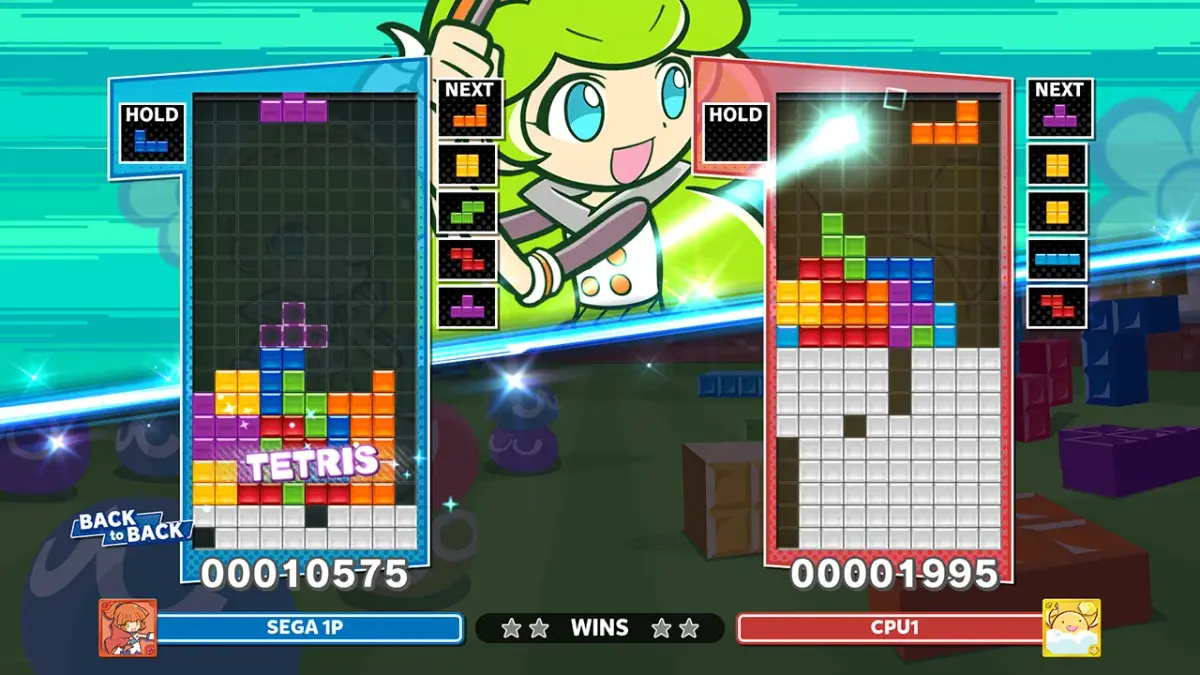
Welcome to Puyo Puyo Tetris 2, a vibrant puzzle game where you'll master the art of dropping Puyos and Tetris blocks to clear the board and outwit your opponents. Whether you're chaining combos in Puyo Puyo or strategically placing T-spins in Tetris, the core gameplay is about quick thinking and even quicker reflexes. It's a fantastic blend of two iconic puzzle games, perfect for both casual fun and competitive play across all platforms.
This guide is your key to conquering every challenge Puyo Puyo Tetris 2 throws at you. We'll cover everything from mastering basic controls and advanced techniques to strategies for beating tough bosses and understanding the nuances of skill cards. Get ready to achieve Gold Medals, unlock Steam Achievements, and dominate every aspect of the game.
Plot (Scenario Mode)
Learn about Arle Nadja and Satan's plan to take over the world in Puyo Puyo Tetris 2 Scenario Mode.
Arle Nadja is a young female spellcaster who aims to thwart Satan's schemes. Currently, Satan is attempting to take over the world, but Arle is determined to prevent him from succeeding.
To stop Satan's evil plans, you must defeat 12 creatures and then confront Satan himself.
- Focus on defeating the 12 creatures first to progress.
- Prepare to face Satan directly after defeating the creatures.
Menu Guides
Navigate Puyo Puyo Tetris 2's menus: Single Player, Multiplayer, Exercise, and Options. Learn key assignments and difficulty settings.
Upon starting Puyo Puyo Tetris 2, you are presented with four main menu options:
- Play the Single Player (Scenario) Mode.
- Play the Multiplayer Mode.
- Play the Exercise Mode.
- Select Option Mode.
The Option Mode allows you to configure various settings:
- Key Assignment: Customize your control inputs.
- Select Difficulty Level in Scenario Mode: Adjust the challenge for the single-player campaign.
- Select number of game match in Multiplayer Mode: Determine the length of your multiplayer sessions.
- Sampling On/Off: Toggle a specific game setting.
- Input Test: Verify your controller inputs are registering correctly.
- Explore the Option Mode early to set up controls and difficulty that best suit your playstyle.
- The Multiplayer Mode settings let you fine-tune match length before you begin playing against others.
Controls
Learn Puyo Puyo Tetris 2 controls: move Puyo left/right, make them fall faster, rotate, start, and pause the game.
Controls:
- LEFT: Move the Puyo to the left or right within the grid.
- RIGHT: Move the Puyo to the right within the grid.
- DOWN: Make Puyo fall faster.
- ACTION: Rotate the pair of Puyo clockwise or anticlockwise.
- START: Start the game or pause the game.
Basic Gameplay
Learn the basics of Puyo Puyo Tetris 2! Understand Puyos, Chains, Garbages, and Combo Chains to dominate your opponents and achieve victory.
Alright, let's dive into the core mechanics of Puyo Puyo Tetris 2! It might seem a bit chaotic at first, but once you get the hang of these basics, you'll be setting up massive combos in no time. Think of this as your friendly guide to understanding the colorful blobs and how to make them work for you.
Puyos: These are your main building blocks. You'll see them falling from the top of the screen in pairs, and they come in five different colors: green, red, blue, yellow, and purple. Your goal is to move and rotate these falling pairs to land them where you want them. They'll stack up, and the magic happens when you connect them.
Chains: The fundamental way to clear Puyos is by matching four or more of the same color together. When you do this, those Puyos disappear! This is called a 'Chain'. If you manage to make a Chain, especially a big one, you'll send 'Garbages' over to your opponent's side, which is key to winning.
Here's how scoring and garbage sending works for simple chains:
| Number of puyos that formed a group | Scores | Garbages produced |
| 5 | 50 | 1 |
| 6 | 180 | 2 |
| 7 | 280 | 4 |
| 8 | 400 | 5 |
| 9 | 540 | 7, and so forth... |
And here's what happens when you form multiple groups of four at once:
| Number of groups (of 4 puyos) formed at one time | Scores | Garbages Produced |
| 2 | 240 | 3 |
| 3 | 720 | 10 |
| 4 | 1920 | 27 |
| 5 | 4800 | 68, and so forth... |
Garbages: These are those annoying grey Puyos that can't be cleared by simply matching them. They're essentially junk that clutters your screen and blocks your plans. The only way to get rid of them is by making a Chain reaction *next* to them. The better your chains, the more Garbages you send to your opponent, and the more they'll have to deal with.
Game Over: The game ends when your screen fills up to the top with Puyos or Garbages. Pay special attention to the third grid from the left, as filling that one can quickly lead to a loss. A single chain might not be enough to win; you'll need to think about setting up bigger combos.
Combo Chains (Chain Reactions): This is where the real strategy comes in! When you make a Chain, any Puyos above the cleared ones fall down. If this falling causes *another* group of four or more of the same color to form, they'll clear automatically. This is a 'Combo Chain' or 'Chain Reaction'. The more Puyos that clear in a single combo, the more Garbages you send to your opponent. It's all about thinking ahead and setting up these chain reactions to overwhelm your opponent. You'll need to be faster and smarter than them to pull off the biggest combos!
Here's a look at how scores and garbage increase with combo chains:
| Number of chains (of 4 puyos) in a combo | Scores | Garbages Produced |
| 2 | 360 | 5 |
| 3 | 1000 | 14 |
| 4 | 2280 | 32 |
| 5 | 4840 | 69, and so forth... |
So, to sum it up: match Puyos to make Chains, use those Chains to send Garbages to your opponent, and try to set up Combo Chains for maximum effect. It takes practice, but you'll get the hang of it!
Similar guides you might like


100% Human-Written. AI Fact-Checked. Community Verified. Learn how AntMag verifies content