
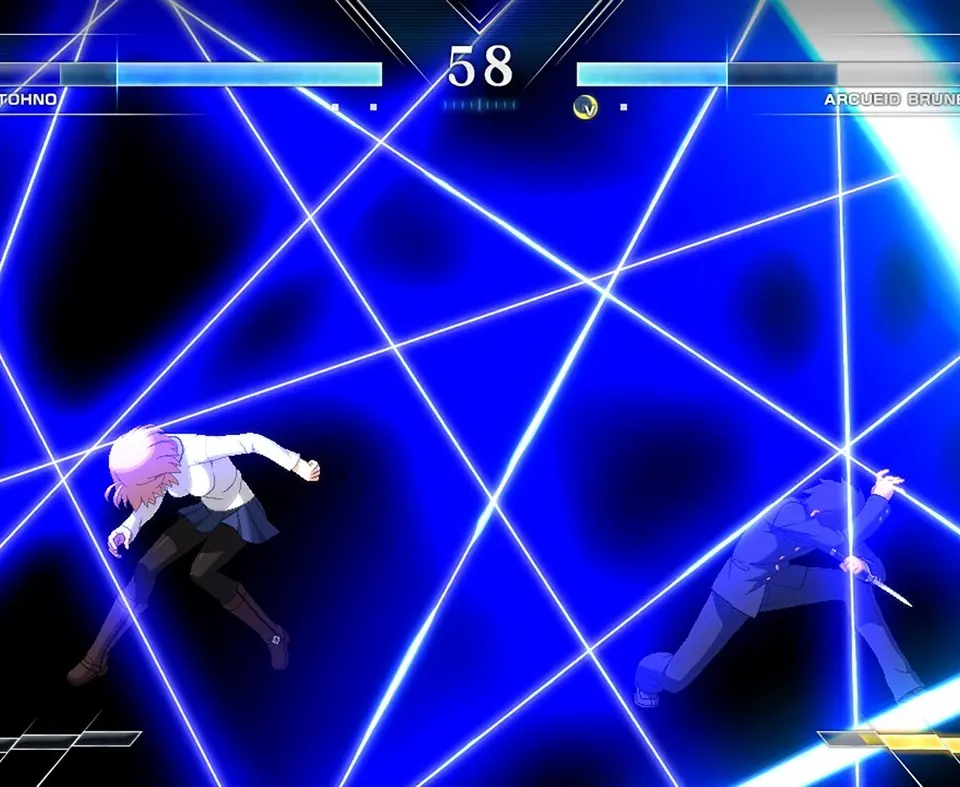
Understand the Melty Blood: Type Lumina UI: health bars, Magic Circuit, Moon Drive, and other crucial in-game indicators.
The UI provides vital information during a match. Understanding each element will help you make informed decisions and react effectively to your opponent's actions. Here's a breakdown of the key UI components:
- Health Bar: Located at the top of the screen for both players. When it reaches zero, you lose the round.
- Magic Circuit Gauge: Positioned at the bottom of the screen. This gauge fills as you deal damage, take damage, and perform certain actions. It's used for EX Specials, Arc Drive, and Last Arc. It has a maximum of 300% (3 bars).
- Moon Drive Gauge: Located above the Magic Circuit Gauge. This gauge fills over time and through specific actions. When full, you can activate Moon Drive for enhanced abilities and combo extensions.
- Moon Skill Gauge: A small icon next to the Moon Drive Gauge. This indicates if you have a Moon Skill available, which consumes a portion of the Moon Drive Gauge.
- Round Counter: Displays the number of rounds won by each player.
- Timer: Counts down the remaining time in the round. If time runs out, You with more health wins.
Keep an eye on your gauges, especially the Magic Circuit and Moon Drive, as they dictate your access to powerful offensive and defensive options. Managing these resources is a core aspect of Melty Blood: Type Lumina's strategic depth.
100% Human-Written. AI Fact-Checked. Community Verified. Learn how AntMag verifies content