Get a grip on Wild Rift! This guide breaks down basic controls and movement so you can dominate the Rift. Learn to move, attack, and cast abilities like a pro.
Hey there! So you're jumping into League of Legends: Wild Rift? Awesome! The first thing you'll want to get a handle on is how to actually move your champion around and use their abilities. It might seem a little overwhelming at first with all the buttons, but trust me, it becomes second nature pretty quickly. Let's break down the basics so you can stop bumping into walls and start making plays!
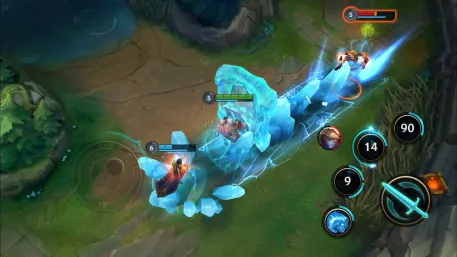
Think of the left side of your screen as your steering wheel. You've got a virtual joystick there. Just place your thumb on it and slide it in the direction you want your champion to go. The further you slide your thumb away from the center, the faster your champion will move. It's pretty intuitive – want to go left? Slide left. Want to go back? Slide down. Easy peasy!
Now, the right side of the screen is where all the action happens. You'll see buttons for your abilities – usually your basic attack, your first, second, and ultimate abilities. Tapping one of these will make your champion perform that action. For most abilities, you'll then see a targeting reticle appear. You can drag this reticle around to aim your ability precisely where you want it to go, and then release the button to fire. Some abilities are instant casts, meaning they'll go off in the direction you're facing as soon as you tap the button, so keep an eye on your champion's facing!
Your basic attack button is usually pretty prominent. Tapping it makes your champion auto-attack the nearest enemy. This is super important for farming minions and dealing consistent damage in fights. You'll also notice a 'Targeting' button, often near your abilities. Tapping this can cycle through different targeting modes, which can be really helpful in chaotic team fights to make sure you're locking onto the right enemy.
Don't forget about the camera! Sometimes you'll want to see more of the map than what's right in front of your champion. You can usually pan the camera by swiping two fingers across the screen, or sometimes there's a dedicated camera control button. Getting a good view of the battlefield is key to making smart decisions and avoiding ganks.
The biggest tip I can give you is to jump into a practice tool or a bot match and just mess around. Try moving your champion in circles, practice aiming your abilities, and get a feel for the auto-attack range. The more you play, the more natural these controls will feel. You'll be zipping around the Rift and landing skill shots like a pro in no time!
100% Human-Written. AI Fact-Checked. Community Verified. Learn how AntMag verifies content