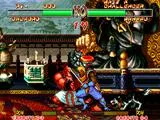
Welcome to Samurai Shodown (2019), SNK's return to the legendary weapon-based fighting series. This game throws you into brutal, high-stakes duels where a single well-placed strike can end the fight. It's a game that rewards patience, precise timing, and understanding your opponent's moves, making every clash feel impactful. Whether you're new to the series or a returning samurai, mastering the art of the blade is key to survival.
This guide covers everything you need to know to emerge victorious. We'll break down the basic controls, delve into specific character strategies, and help you navigate the various game modes. From landing your first combo to understanding the nuances of each fighter's unique abilities, this guide is your companion on the path to becoming a true master.
Guide and Move List (GEN) by Zachary1021
Comprehensive guide and move list for Samurai Shodown (2019), covering gameplay, characters like Haohmaru, and 1 Player Mode. Updated 10/11/2024.
- 1Review the Introduction section for an overview.
- 2Familiarize yourself with Gameplay and Controls to understand the fundamental mechanics.
- 3Consult the Characters / Move List section for detailed command inputs and special techniques for each fighter, including Haohmaru, Nakoruru, Ukyo Tachibana, Jubei Yagyu, Galford, Kyoshiro Senryo, Wan-Fu, Charlotte, Tam Tam, Gen-An Shiranui, Hanzo Hattori, and Shiro Tokisada Amakusa.
- 4Explore the 1 Player Mode, which includes options for Vs. CPU matches, facing the Final Boss, and understanding the different Endings.
- 5Check the Extras section for information on Glitches and available Video Guides.
- 6Read the Conclusion for final thoughts.
- The guide was last updated on 10/11/2024 and was a FAQ of the Month Winner in February 2024.
- Navigate easily using the Table of Contents.
- Refer to the 'Previous' and 'Next' links for sequential browsing through related content.
Haohmaru
Learn Haohmaru's special moves, throws, and combat strategies in Samurai Shodown (2019). Master the Fugu Blade with our comprehensive guide.
Haohmaru: The Samurai with Nerves of Steel
Age: 25 Birthplace: Musashinokuni, Japan Weapon: The Fugu Blade Martial Arts School: Self-taught
Stage: Gairyu Isle (Day)
Dedicated to the fighting life, Haohmaru spends his time training with his most treasured possession, his Fugu Blade, and traveling in search of worthy opponents. A famous warrior, he focuses solely on the moment when fighting, in order to push his limits to the utmost.
Controls:
| Main | Alt. |
* * *
Throw
| Overhead Throw ← / → + MS / MK HS / HK | Throws the opponent. Can be done without a weapon. | |
| Performing this throw with HS / HK will deal slightly more damage than performing it with MS / MK |
* * *
Special Moves
| Ougi Senpu Retsu Zan (Cyclone Slash) ↓ ↘ → + S | Sends a tornado forward that knocks the opponent up. | |
| Ougi Kogetsu Zan (Crescent Moon Slash) → ↓ ↘ + S | Spins and then jumps up with a slice. | |
| Haohmaru can't perform his special moves while unarmed | ||
| Even if the opponent blocks MS or HS, you can cancel the recovery frames with Senpu Retsu Zan | ||
| Kogetsu Zan is invincible at the start, but he can still get hit right before he jumps | ||
| Far Standing LK / MK hits low |
You can check out another character below, or you can get started the 1 Player Mode
| Gen-An | Galford | Haohmaru | Ukyo | Charlotte | Tam Tam |
| Nakoruru | Wan-Fu | Jubei | Hanzo | Kyoshiro | Amakusa |
Previous: Characters / Move List
Next: Nakoruru
Guide and Move List (GEN) by Zachary1021 (2)
Comprehensive Samurai Shodown (2019) guide covering gameplay, controls, character move lists, 1 Player Mode, and extras like glitches.
Sections:
- Introduction
- Gameplay / Controls
- Characters / Move List (Haohmaru, Nakoruru, Ukyo Tachibana, Jubei Yagyu, Galford, Kyoshiro Senryo, Wan-Fu, Charlotte, Tam Tam, Gen-An Shiranui, Hanzo Hattori, Shiro Tokisada Amakusa)
- 1 Player Mode (Vs. CPU, Final Boss, Endings)
- Extras (Glitches, Video Guides)
- Conclusion
- The guide was last updated on 10/11/2024 and was a FAQ of the Month Winner in February 2024.
- Refer to the 'Characters / Move List' section for specific character inputs.
- Explore '1 Player Mode' for CPU matches, boss encounters, and different endings.
- The 'Extras' section contains information on glitches and video guides.
Gameplay / Controls
Learn the ins and outs of Samurai Shodown (2019) controls, including button mappings for 3 and 6-button controllers, movement, normal attacks, special moves, blocking, and throws.
This guide covers the essential gameplay mechanics and controls for Samurai Shodown (2019). Understanding these fundamentals is crucial for mastering the game.
The game screen displays your health, points, timer, and POW meter. The objective is to deplete your opponent's health to zero to win a round. Matches are best of 3 rounds.
Samurai Shodown emphasizes precise and powerful strikes. While combos are possible, knowing the range, speed, and safety of your attacks is more important than complex combos.
II. Controls
A 6-button controller is highly recommended for an easier experience, especially for executing kicks and special moves. Controls can be customized in the options menu.
6 Button Controller Layout:
| Action | Button |
|---|---|
| Light Slash (LS) | X |
| Medium Slash (MS) | Y |
| Heavy Slash (HS) | Z |
| Light Kick (LK) | A |
| Medium Kick (MK) | B |
| Heavy Kick (HK) | C |
3 Button Controller Layout:
| Action | Button |
|---|---|
| Light Slash (LS) | A |
| Medium Slash (MS) | B |
| Heavy Slash (HS) | C |
| Light Kick (LK) | A + B |
| Medium Kick (MK) | B + C |
| Heavy Kick (HK) | C + A |
Unlike the Neo Geo version, a Heavy Slash can be performed without pressing Light and Medium Slash simultaneously on a 6-button controller. This option is not available on a 3-button controller.
Movement:
- Run: Press Forward twice and hold.
- Back Dash: Press Back twice.
- Jump: Press Up.
- Triangle Jump: Some characters can perform this by pressing the opposite direction after jumping to a wall.
III. Normal Attacks
Normal attacks vary in speed and damage. Light attacks are fast but deal less damage, while Heavy attacks are slower but more powerful. The speed of an attack can depend on the character.
Proximity Normals: Some attacks have different effects depending on the distance from the opponent. For example, Light Slash might perform a sword slash when far away and a different close-range attack when up close. This applies to both standing and crouching attacks.
Normal attacks deal no damage if blocked. A blocked attack can cause your character to stagger briefly, leaving them unable to move. Attacks with longer stagger times when blocked typically deal more damage.
IV. Special Moves
Special moves are more difficult to execute, often requiring specific directional inputs combined with a button press (e.g., ↓ ↘ → + S for Haohmaru's Senpu Retsu Zan). The input is reversed when facing left (↓ ↙ ← + S).
Special moves can deal significant damage and inflict chip damage even when blocked. The strength of the button used (Light, Medium, Heavy) can alter the move's properties. For example, the Light Slash version of Senpu Retsu Zan might produce a slow projectile, while the Heavy Slash version produces a faster one.
Special moves can also be used to cancel the animation of normal attacks. This is useful for performing combos and for canceling the stagger animation that occurs when a normal attack is blocked. For instance, if an opponent blocks Haohmaru's standing Heavy Slash, he can cancel into Senpu Retsu Zan.
V. Blocking / Throws
To block, hold Back or Down + Back. Normal attacks deal no damage when blocked, but special moves inflict chip damage.
Attack Types and Blocking:
- Mid Attacks: Can be blocked while standing or crouching. Most standing attacks and many special moves are mids.
- High Attacks: Must be blocked while standing. These are often jump attacks and some special moves.
- Low Attacks: Must be blocked while crouching. Many crouching attacks are lows, but some are mids. Certain special moves can only be blocked low.
A general tip for beginners is to block crouching when the opponent is on the ground and standing when they are airborne. However, it's also possible to interrupt an opponent's aerial attack instead of blocking.
Throws:
Throws can break through an opponent's defense as they cannot be blocked. To perform a throw, press Forward + Medium Slash or Medium Kick while close to the opponent. Pressing Back instead of Forward can result in a backward throw. Some throws deal more damage if you rapidly press the buttons; mashing buttons can also help escape such grabs faster.
Similar guides you might like

100% Human-Written. AI Fact-Checked. Community Verified. Learn how AntMag verifies content