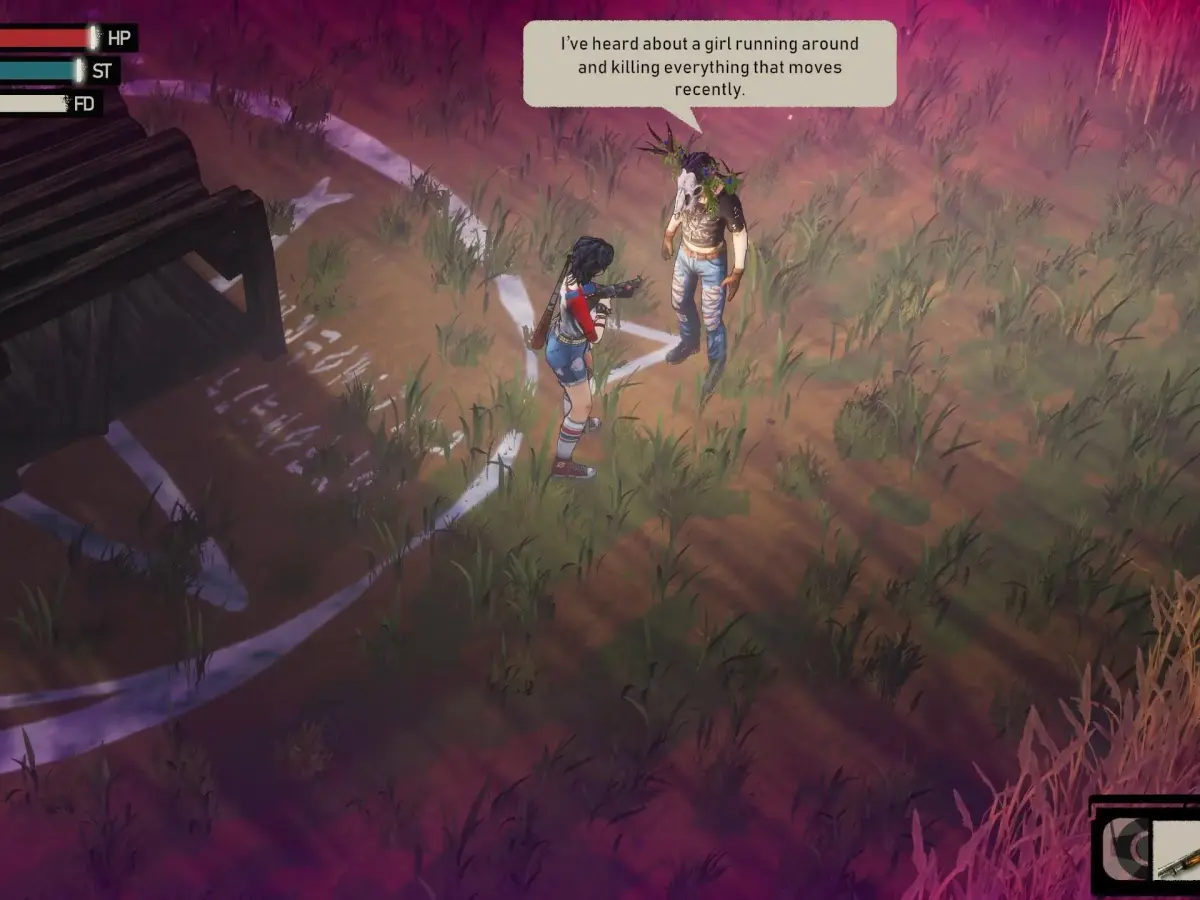

Understand the I Hate This Place UI, from health bars and stamina to crafting menus and inventory management. Learn to use the First Aid Kit effectively.
A thorough understanding of the User Interface (UI) is crucial for survival and progression in I Hate This Place. This section breaks down every on-screen element, its function, and its typical location, ensuring you can manage your resources, track your objectives, and navigate the harsh world with confidence.
Core Gameplay HUD Elements
When you're out in the field, the primary gameplay screen provides vital information at a glance:
- Health Bar: Typically located in the upper-left corner of the screen, this bar visually represents your character's current health. It depletes as you take damage and can be replenished using consumables. When it reaches zero, you will perish.
- Stamina Meter: Often positioned near the health bar, this meter governs your ability to perform strenuous actions like sprinting, dodging, and performing heavy attacks. It regenerates over time when you are not actively expending it. Managing stamina is key to avoiding being overwhelmed in combat.
- Hunger/Thirst Meters: These meters, usually found near the health and stamina bars, indicate your character's basic survival needs. If they deplete too far, negative status effects will begin to manifest, impacting your performance. Regular consumption of food and water is essential.
- Objective Marker/Compass: A directional indicator, often at the top or bottom of the screen, points you towards your current primary objective. A compass may also be present, showing cardinal directions and potentially highlighting points of interest or important NPCs.
- Contextual Prompts: These appear dynamically on screen to inform you about available actions, such as interacting with objects, picking up items, or initiating crafting. They will often display the required button input.
- Status Effect Icons: Small icons will appear near your health bar to indicate any active status effects, such as poison, bleeding, or buffs. Hovering over or examining these icons (if the UI allows) will provide more detail.
Inventory and Item Management
The inventory screen is your central hub for managing all the items you collect. Accessing it typically involves pressing a dedicated button (e.g., 'I' on PC). The interface is designed for efficient organization and quick access to essential gear.
- Grid-Based Layout: Your inventory is usually presented as a grid, with each slot capable of holding a stack of a particular item. The size of this grid determines your carrying capacity.
- Item Categories: The inventory may be further organized into tabs or sections for different item types, such as weapons, armor, consumables, crafting materials, and quest items. This makes finding specific items much easier.
- Item Information Panel: When you select an item, a panel will appear, displaying detailed information such as its name, description, weight, stack size, and any associated stats or effects.
- Equip/Use/Drop/Store Options: From the inventory screen, you can typically perform actions like equipping weapons and armor directly to your character, using consumables, dropping unwanted items to free up space, or transferring items to a storage chest if one is available.
- Weight/Capacity Limit: Be mindful of your inventory's weight or slot limit. Exceeding this can result in slower movement speed or other penalties.
Crafting and Blueprints
Crafting is a cornerstone of survival in I Hate This Place, allowing you to create vital tools, weapons, and survival gear. You'll access the crafting interface through specific crafting stations or a dedicated menu.
- Blueprint System: You discover new crafting recipes through blueprints. These are often found in the world, looted from enemies, or awarded for completing quests. Once acquired, they are added to your crafting menu.
- Crafting Menu: This menu displays all the blueprints you have unlocked. Selecting a blueprint will show you the required crafting components and the resulting item.
- Component Requirements: Each craftable item lists the specific materials needed. For example, to craft a Simple Bedroll, you might need Scrap Metal and Cloth Scraps. To craft a more advanced item like a Makeshift Shotgun, you'll need more complex components like Pipe Fittings, Springs, and Gunpowder.
- Crafting Station Interaction: Some advanced items may require you to use a specific crafting station, such as a Workbench for weapon modifications or a Campfire for cooking. The UI will indicate if a station is required.
- Crafting Queue: If you have sufficient materials, you can initiate the crafting process. Some crafting actions may take time, and the UI will often display a progress bar.
- Example: The "Meat and Potatoes" Blueprint: Upon finding the Meat and Potatoes blueprint, you unlock the ability to craft a hearty meal. This recipe might require items like Raw Meat (obtained from hunting animals) and Potatoes (found growing in certain areas or looted from containers). Crafting this meal at a campfire will restore a significant amount of hunger and provide a temporary stamina boost.
Map and Navigation
Navigating the dangerous environments of I Hate This Place is made easier with the in-game map.
- World Map: Accessible through a dedicated menu option, the world map displays the areas you have explored. Key locations, points of interest, and your current position will be marked.
- Minimap: A smaller, often circular map displayed in a corner of the HUD, showing your immediate surroundings. It will typically highlight nearby enemies, resources, and quest markers.
- Fast Travel Points: If fast travel is implemented, discovered locations or activated points of interest will be marked on the map, allowing for quicker traversal between areas.
Other Important UI Elements
- Quest Log: A dedicated menu where you can review active and completed quests, their objectives, and any associated lore or dialogue.
- Character Sheet/Status Screen: This screen displays your character's attributes, skills, equipped gear, and any active buffs or debuffs.
- Dialogue Interface: When interacting with NPCs, a dialogue window will appear, presenting conversation options.
100% Human-Written. AI Fact-Checked. Community Verified. Learn how AntMag verifies content