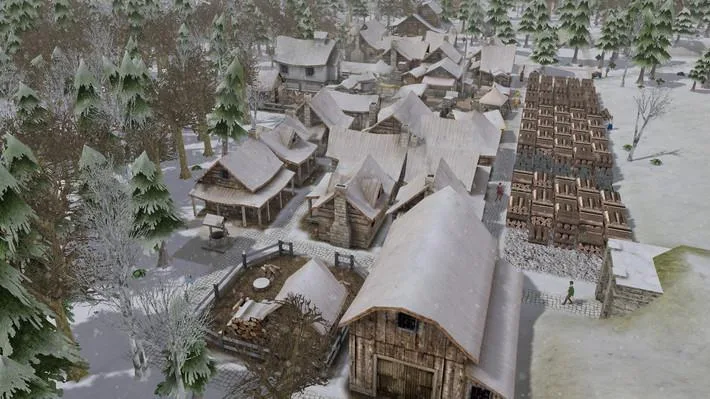
Welcome to Banished, a challenging survival city-builder from Shining Rock Software where you guide a group of exiled settlers trying to establish a new life. You'll manage every aspect of their existence, from gathering food and resources to assigning jobs and keeping them happy, all while battling harsh winters and the constant threat of starvation. It's a game for players who enjoy deep resource management and the satisfaction of building a thriving community from scratch.
This guide will help you navigate the intricate systems of Banished, focusing on core concepts like town planning, resource management, and citizen happiness. We'll cover everything from initial settlement strategies to achieving self-sufficiency, offering detailed advice to help you overcome the game's notorious difficulty and build an enduring community.
Part 1
Learn the basics of Banished! This guide covers essential concepts like stockpiles, farming, winter survival, tools, clothing, and how to generate your first map.
Hey there! Welcome to Banished. If you're just starting out, this guide is going to walk you through everything you need to know to get your first little town up and running. We'll cover some core ideas that are pretty common in this kind of city-building game, and then dive into the specifics of Banished. We'll get you set up with a basic town and then touch on some more advanced stuff later on.
Before we jump into the game itself, let's get a handle on a few key concepts. You'll see these in other games like Dwarf Fortress or Gnomoria too. First up are stockpiles. Think of these as designated areas where your citizens will store all sorts of resources. In Banished, you'll have specific Stockpiles for raw materials and Barns for finished goods like food and drink. Keeping your people fed is absolutely crucial – if you run out of food, your town won't last long!
Then there's winter. Remember, nothing grows during the winter months. Your only food sources will be what you managed to gather and store during the warmer seasons, and whatever your gatherers can find. You'll also need to keep an eye on tools and clothing. Tools help your citizens work faster, but they do wear out and need replacing. No tools means slower work! Clothing keeps your citizens warmer for longer, letting them work outside in the cold without constantly running back home to thaw out. Like tools, clothing also degrades over time.
Finally, your citizens will try to warm up in their houses, especially if they have firewood. Different houses offer better heating and use less firewood. That covers the basics! Now, let's quickly go over how to generate your first map.
Creating a map in Banished is pretty straightforward. In the 'New Game' menu, you'll fill out a few fields. The first is your Town Name, which also names your save file. Next is the Map Seed – this is just a number that the game uses to generate the map. If you use the same seed with the same map settings, you'll get the exact same map every time, which is handy for recreating specific layouts.
The settings that really affect the map are Terrain Type and Terrain Size. Terrain Type determines if you're mostly in valleys with some mountains, or vice versa. 'Mountains' terrain is generally harder because there's less flat space to build. Terrain Size influences how large the mountains and valleys are. Then there's Climate, which controls how warm or cold the weather is. 'Mild' keeps things relatively warm, while other settings make winters longer and harsher. For your first game, I'd recommend sticking with 'Mild'.
Disasters control whether random events like tornadoes can hit your town. These can be devastating, so it's a good idea to turn them off while you're learning the ropes. The last setting is Starting Conditions. This dictates what supplies you begin the game with. There's a description for each setting that tells you exactly what you'll start with. I'm going to assume you're using the easiest starting conditions for now. Once you've got your map set up, we'll move on to understanding the menus so you can actually start playing!
Part 2
Learn Banished controls, how to use the menu bar, and start basic gameplay with this guide. Pause time with spacebar.
Controls:
- WASD - Move the map
- QE - Rotate the map
- Mouse Wheel - Zoom in and out
- Escape - Pause menu
- Spacebar - Start/pause time
The menu bar, located in the lower right corner, is your primary interface for controlling the game.
Menu Bar Breakdown:
- Time Controls: Pause, resume, speed up (up to x10), or slow down time.
- Utilities Button: Opens a sub-menu with the following options:
- Information Button: Displays town population, supplies, time of year, and weather.
- Event Log: Shows recent events, such as a cave-in at a mine that killed someone.
- Map: Provides an overview of the game world.
- Professions: Manage citizen job assignments. Includes a Laborer job for tasks like chopping trees and mining. Farmers become laborers in winter. Hovering over jobs shows tooltips.
- Limits: Set production limits for items. Default limits are provided at the start.
- Priority Button: Increase the priority of selected jobs to complete them sooner.
- Pathing Button: Shows citizen routes between homes and workplaces to identify areas for road construction.
- Bookmarking Buttons: For saving camera locations and other tasks.
- In-game Help: Offers assistance on selected items or buildings.
- Building Homes (House-shaped button): Build wood or stone homes. Stone homes retain heat better, requiring less firewood in winter. A boarding house is also available for temporary housing.
- Roads and Bridges (Wheel button): Construct dirt roads (no resources needed), stone roads (require stone, faster citizen movement), bridges (to cross water), and tunnels (to pass under mountains, expensive).
- Stockpile Button: Build barns, stockpiles, market squares (for easier supply pickup), and trading posts (must be placed on a river or lake connected to the map edge for traders).
- Town Services (Hammer button): Build wells (for firefighting and water access), schools, hospitals, town halls, chapels, and cemeteries.
- Food Production (Apple button): Construct farms, orchards, pastures, fishing docks, hunting huts, and gatherers huts.
- Resource Production: Build structures for resource gathering and processing, including woodcutters (firewood), foresters (raw wood), herbalists, blacksmiths, tailors, breweries, mines, and quarries.
- Harvesting Raw Materials: Tear down buildings, harvest materials in an area, or specifically harvest wood, stone, and iron. Also includes buttons to remove roads and cancel removal.
- Pause Menu (Last button): Access the game's pause menu.
Basic Gameplay Start:
Assuming easy starting conditions, you begin with some buildings, people, and one type of animal (cows, sheep, or chickens), along with raw materials.
Initial Steps:
- Warning: Open the job menu and assign a few citizens to the builder job.
- Build a woodcutter's to start stockpiling firewood for winter.
- Construct another, larger stockpile.
- To make a woodcutter's, go to the resource production menu, select the woodcutter button, rotate it with 'T' if needed, and place it.
- To make a stockpile, go to the stockpile menu.
- Always ensure you have a few laborers to keep tasks like chopping trees and mining moving.
- Farmers temporarily become laborers during winter.
- Check the event log periodically for important occurrences.
- Consider building a well early for fire suppression.
- Stone roads allow citizens to move faster than dirt roads.
Part 3
Learn how to establish essential resource production like wood, food, and stone in Banished. This guide covers farms, fishing docks, pastures, foresters, and more.
This guide covers the initial setup for your first town in Banished, focusing on resource production and essential buildings. We'll go over how to place your stockpile, assign jobs, and build structures for food, wood, and stone.
- 1Stockpile: Select the stockpile tool, click and drag to define an area for your stockpile. A green box indicates a valid area; red means it's invalid. Right-click to cancel.
- 2Woodcutter: Assign a citizen to the woodcutter job via the jobs menu to start gathering firewood.
- 3Food Production:
- Gatherer's Huts: Place these near forests for good food production. Assign citizens to work there.
- 4Fishing Docks: Build these near water for year-round food, though less than gatherer's huts.
- 5Farms: Plant crops that grow over the year and are harvested in the fall. A 7x7 farm is recommended, requiring one farmer.
- 6Orchards: Similar to farms but take several years to produce fruit. Useful for making drinks at a tavern later.
- 7Pastures: If you have animals, build a pasture for at least 10 animals. Pastures require only one worker and can be split to double animal capacity.
- 8Resource Collection: Use the resource collection menu to assign laborers to chop trees for wood and mine stone and iron.
- 9Forester's Hut: Build this for a constant supply of wood. Foresters plant new trees and cut down old ones.
- 10Herbalist: Construct a herbalist's hut to gather herbs, which help prevent disease and keep citizens happy.
- 11Optional Buildings:
- Hunter's Cabin: Hunts deer for meat and hides. Effective in open spaces or dense forests.
- 12Quarry: Provides a constant supply of stone but requires significant resources and space.
Advanced Gameplay Topics:
- Trading Post: Must be placed on water connected to the map edge. Assign a trader to stock it with items for trading with visiting merchants. Be aware that traders can bring diseases.
- School House: Children attend school here before becoming adults, becoming educated. Educated adults are more efficient workers.
- Hospital: Used to treat the sick and prevent disease spread.
- Town Hall: Provides a census and other town information.
- Chapel: Where a priest gives sermons to keep the population happy.
- Cemetery: Allows citizens to bury their dead and show respect, reducing sadness from elder deaths.
Dealing with Pests and Blights:
- Farms/Orchards: Harvest and leave the affected area empty to stop blight spread. For orchards, chop down and replant trees. Planting different crops can reduce recurrence.
- Pastures: Isolate infected animals and kill them by setting the pasture's animal level to 0 to eliminate pests.
- If you run out of workers, juggle existing assignments and wait for children to grow up.
- Educated workers are significantly more efficient. Prioritize building a school house.
- Trading posts are essential for acquiring goods you can't produce easily, but be cautious of diseases.
- Managing pests and blights is crucial for maintaining consistent production from farms, orchards, and pastures.
Part 4
Dive into Banished's advanced gameplay! Learn how blacksmiths craft tools, why clothing matters for your villagers, and how taverns boost happiness. Your Banished village awaits!
Alright, let's talk about some of the finer points of keeping your Banished village running smoothly, focusing on tools, clothing, and the all-important tavern.
First up, tools. These are crucial for making your citizens work faster and more efficiently. Think of them as essential upgrades for your workers. The catch? They break over time. To keep your villagers equipped, you'll need a blacksmith's shop and the right materials. Crafting iron tools uses wood and iron, which is decent. But for the best performance, you'll want steel tools, and that requires coal. You can get coal from a mine. Mines, much like quarries, are permanent structures that produce a massive amount of resources before they're depleted, so don't worry too much about running out.
Next, let's consider clothing. This might not seem like a big deal at first, but it's a game-changer, especially in colder climates. Good clothing allows your citizens to stay outside and work longer without having to constantly run back home to warm up. This is a huge benefit for your gatherers and fishermen, who spend their days out in the elements. The more time they can spend working, the more food and resources you'll bring in for your village.
Finally, the tavern. This is your go-to spot for keeping your citizens happy! You can use it to produce drinks from the berries and fruit you harvest from your orchards. Happy citizens are productive citizens, so make sure you're keeping those drink supplies stocked!
That pretty much covers the advanced gameplay elements. Banished might seem simple on the surface, but there's a surprising amount of depth to explore. And who knows, maybe you'll even get into modding down the line!
Similar guides you might like



100% Human-Written. AI Fact-Checked. Community Verified. Learn how AntMag verifies content