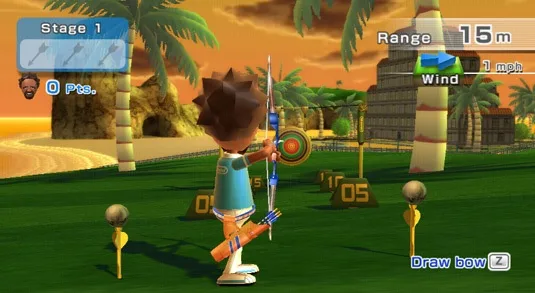
Welcome to Wii Sports Resort, the vibrant sequel to the original Wii Sports! Developed and published by Nintendo in 2009, this exclusive Wii title invites you to a tropical paradise where you'll master a variety of fun-filled island activities. From the fast-paced action of Swordplay to the precision required in Frisbee Dog, and the satisfying arc of a perfect golf swing, Resort offers a diverse range of challenges for every player. It's the perfect game to pick up and play, whether you're aiming for athletic supremacy or just looking for some lighthearted competition.
This guide is your key to conquering every corner of the resort. We'll dive deep into optimizing your Mii's performance, explore advanced techniques for sports like Swordplay, and provide strategies to perfect your swing across all disciplines. Struggling to unlock those elusive stamps? We've got you covered. Get ready to achieve ultimate athletic supremacy and discover everything this island paradise has to offer.
Part 1
Get the introduction and legal info for Wii Sports Resort, including details on the Wii MotionPlus attachment. Updated August 6, 2009.
Version: 1.0
Updated: 08/06/2009
Introduction: Wii Sports Resort is the follow-up to Wii Sports, featuring 12 sports with 10 brand new ones. It utilizes the Wii MotionPlus attachment for more sensitive and responsive controls.
Wii MotionPlus Info: The Wii MotionPlus attachment is included with the game and makes the Wii remote response far more sensitive, showing even the slightest movement on screen for more responsive controls.
Legal Info / Contact Details:
- This guide is Copyright (c) Matthew Stephenson (Ringworm), 2009.
- The latest version of this FAQ will always be found at www.gamefaqs.com.
- Other sites may host the FAQ if obtained from www.gamefaqs.com without any edits.
- No charge for people to download the file is allowed.
- Questions or comments can be sent to ringwormrulez[at]gmail[dot]com.
- Include the game name in emails.
- No attachments or emails with no subject line will be read.
- All names, characters, the game itself and related material are Copyright of Nintendo, 2009.
- To quickly navigate the guide, copy and paste the code after the section entry into your program's "Find" option (CTRL+F on Windows).
- If information is not yet included, it will likely be added in the next week.
- Check www.gamefaqs.com for the latest version of the FAQ.
Part 2
Learn how to set up the Wii MotionPlus, navigate the Wii Sports Resort menus, and understand initial game settings. Part 2 of the guide covers system updates, calibration, and Mii integration.
The Wii MotionPlus attachment is required for every player and is included with the game. Additional MotionPlus attachments are sold separately. The attachment replaces the remote's jacket and integrates a new, slightly stretchier one. Installation involves sliding the Wii Remote into the MotionPlus, threading the wrist strap, and securing it to the remote's base. Replacing batteries requires removing the attachment.
A video tutorial on installation and removal is shown on the game's first startup. The MotionPlus can remain attached for other games and allows for Nunchuk and other attachments to be plugged into its base. It adds minimal weight to the remote.
Initial Setup and Menus:
- System Update: After inserting the disc, a system update may be required, taking approximately 90 seconds.
- Wii MotionPlus Video: A mandatory 3-minute video about the Wii MotionPlus will play.
- Save File Creation: Create a save file for Wii Sports Resort, which uses 4 blocks of memory.
- MotionPlus Calibration: Calibrate the MotionPlus by placing the remote face down on a flat surface or holding it still for about 4 seconds. This is required each time a remote is turned on with the game.
- Mii Introduction: A Mii will parachute from a plane. Press 'A' to watch the jump. You can control the Mii in freefall for about 30 seconds before parachutes open and the title screen appears.
Title Screen and Game Listing:
At the title screen, press 'A' and 'B' together to access the game listing menu. Point at an option and press 'A' to select, or 'B' to go back. The game listing menu includes a 'Settings' option.
Settings Menu Options:
- Change Player List: Remove Mii's from your player list (up to 100 sets can be stored).
- Import from Mii Contest Channel: Add Mii's from worldwide users as background players or teammates.
- Sensor Bar Assist: This option's function is unclear, but it is recommended to leave it on. It may affect MotionPlus sensitivity if turned off.
This section covers the initial setup and menu navigation. Subsequent sections detail each sport.
Part 3
Master Wii Sports Resort's Duel, Speed Slice, Showdown, Wakeboarding, and Frisbee activities. Learn stamp conditions and strategies.
Duel
- 1Choose the number of players (1-2), select Miis for each person, and start.
- 2Swing your Wii Remote like a sword to attack.
- 3Hold the B button and swing to defend against your opponent's attacks.
- 4The objective is to knock your opponent into the water twice before they do the same to you.
- 5If your attack is blocked, you will be momentarily stunned, leaving you vulnerable to a counter-attack.
Stamps:
- On the Edge: Get this stamp when the outer ring falls away for the deciding round between two opponents who are locked in a draw. It doesn't matter whether you win or lose. You can only get this stamp in single player mode.
- Straight to the Point: Push your opponent out of the ring with a straight lunge in single player mode.
- Stalemate: End the first three rounds of a duel in a draw, then draw again in the deciding round for a completely even match in single player mode. You may not have won, but it's quite a rare achievement!
- All Too Easy: Push your opponent out of the ring with only one strike in single player mode.
- There Can Only Be One: Defeat the champion in a duel. The key is to leave no gaps in your defence and always swing to hit. There may even be some sort of reward if you win this...
Speed Slice
- 1Choose the number of players (1-2), select Miis for each person, and start.
- 2The judge will throw objects in front of you.
- 3Slice these objects in the direction of the arrow.
- 4The first player to slice correctly gets a point. The first to 10 points wins.
Comments: Quick reactions are necessary to win this. A simple slash in the direction of the arrow is all that is required - it doesn't have to be perfectly in the same direction, but must be close.
Stamps:
- Slice and Dice: Win the contest without missing a single object by slicing the wrong way or failing to slice within the time limit. .
- No Object Unsliced: Correctly slice at least one of each of the 18 types of object in single player mode. Different colours count as different types. You need to play several rounds to get them all!
- Focus Your Mind: Slice an object in the correct direction before it hits the ground in single player mode. This requires a lot of skill... or luck.
- Double Digit: Slice the alarm clock when the two digits on the display are the same, such as 8.8, 7.7 or 6.6. .
- A Cut Above: Beat the Speed Slice champion. Just empty your mind and slice on instinct!
Showdown
- 1Choose your Mii and the level you want to play, then start.
- 2You proceed forward automatically along the path.
- 3You will be attacked by Miis in groups of about 10 (on average), with around 40 Miis per level.
- 4You can be hit up to three times per level.
- 5The level ends when you beat the last Mii - usually the hardest to beat in the level.
- 6Defeat all enemies to win.
Comments: The art of parrying is vital for the final Showdown stage.
Stamps:
- Not a Scratch: Clear any stage without losing any hearts by taking hits.
- Stage 10 Clear: Defeat all opponents and clear all 10 first stages. You can't just swing at random if you hope to get to the end; this requires finesse.
- Perfect 10: Clear Stage 10 without losing any hearts by taking hits.
- The Final Showdown: Clear the final Showdown stage.
- Untouchable: Clear the final Showdown stage without losing any hearts by taking hits.
Wakeboarding
Starting up: Choose the number of players (1-4), Miis for each person, and difficulty, then start.
Controls: Hold the Wii Remote horizontally, with the d-pad on the left. Tilt left or right to move in that direction, flick when on a wake to jump.
Comments: Practicing is key to this as far as I can tell - knowing which way the boat is about to turn, as it messes up a lot of your jump attempts when you don't know. Landing is also crucial - you need to be flat with the water or you will get no points for the jump.
Stamps:
- 100-Point Jump: Score 100 points on a single jump. Build up speed and do cool tricks in the air and your scores will shoot up!
- Seven Jumps: Execute 7 or more different kinds of jumps on a single run. Try varying your speed and the length of your approach to perform different jumps.
- Surf Skimmer: Land correctly on the water 10 times in a row. Even if you pull off an amazing jump, it won't score any points if you don't land properly. Keep the board nice and flat when landing.
- Clear Run: Get 1000 points or more on the Expert level without hitting any obstacles.
- Circumnavigator: Wakeboard all the way around Wuhu Island and do 50 successful jumps in Free Cruising Mode. You have to complete a course afterwards to get the stamp.
Frisbee
There are two gameplay modes in the Frisbee category: Frisbee Dog and Frisbee Golf. One play of Frisbee Dog unlocks Frisbee Golf.
Frisbee Dog
Walkthrough: Throw the Frisbee at the arrow for the dog to catch. Angle your throw carefully.
Part 4
Unlock stamps in Wii Sports Resort Frisbee Dog, Frisbee Golf, and Archery. Learn how to get Bulls in a Row, Hole-In-One, and more.
Frisbee Dog Stamps:
- Mid-Air Catch: Throw the Frisbee right into the centre of the target area to make the dog jump up and catch it in mid-air.
- Practice Makes Perfect: In Practice Mode, pop all nine balloons in ten throws or less. A fresh set of nine balloons appears after every ten throws. You have to complete a game of Frisbee Dog afterwards to get the stamp.
- 10 x 10: Score 10 points with each of your 10 throws. That means hitting the turquoise 10-point zone every time. You can't get this stamp in team play.
- Dead Centre: Hit the centre of the target area and score 100 points with each of your ten throws. Extra points scored by popping balloons don't count. .
- Perfect Score: Score 100 points with every throw and pop every balloon. That'll get you 1500 points. .
Frisbee Dog Controls:
Stand side on to the screen. Holding the remote horizontally, move it left, then right with a flick towards the screen (for right handers - your right side should be the one facing the screen). Don't let go of the remote! This is for Automatic controls. The key to this mode is stopping your swing in the right position to release it correctly. Manual requires you to hold down B as you throw, releasing B to release the frisbee. Auto is preferred by some, although manual is probably better for higher scores.
Frisbee Dog Comments: You will have 10 throws at a target. Hitting the turquoise zone is 10 points, the orange is worth 50, and the purple is worth 100 points. Missing gets 0. The angle you throw the frisbee, and when you release are the keys here. Tilting the remote in different directions will make it fly in that direction. Throwing upwards slightly is also recommended, moving slightly upwards as you flick the remote. Your first five shots have a target only - aim straight at it. The last 5 also have balloons - worth 50 points each, and more after this if you both hit the balloon and land in the 100 point zone. You will need to master the angle for these throws - aim at the balloon, with an angle to get you to the target.
Frisbee Golf Stamps:
- Under Par: Finish any course under par (in less than the set number of shots for the course). 0 is par, and a score of -1 or less is under par. .
- Skip to Safety: Get this stamp when a Frisbee bound for a water hazard skips across the surface of the water and lands safely on the other side.
- Rolling Goal: Throw the Frisbee from outside the green to make it hit the ground and roll into the target area.
- Hole-In-One: Get the Frisbee into the target area with just one throw.
- A Clean 18: Play an 18-hole round of Frisbee Golf without ever throwing the disc out of bounds or into a water hazard. .
Frisbee Golf Controls:
Stand side on to the screen. Holding the remote horizontally, move it left, then right with a flick towards the screen (for right handers - your right side should be the one facing the screen). Don't let go of the remote! This is for Automatic controls. The key to this mode is stopping your swing in the right position to release it correctly. Manual requires you to hold down B as you throw, releasing B to release the frisbee. Auto is preferred by some, although manual is probably better for higher scores.
Frisbee Golf Comments: The aim is to complete each hole in the minimum number of shots possible. Instead of a hole to aim for, in this mode you have an area on the green you need to pass through, meaning it is much easier to get in from off the green. This is a good thing, as you can't throw a frisbee as far as you can hit a golf ball. Aiming is crucial here - try to keep it on the fairway, as the frisbee will skid further on this than in the rough or bunker.
Archery Stamps:
- Bulls in a Row: Hit the bull's-eye and get the full 10 points with all 3 arrows in one stage. This can be in any difficulty level, but not in team play. The easiest way to do it is in Stage 1 of the Beginner level.
- Stay on Target: Hit the target with all 3 arrows in each of the 4 stages. This can be in any difficulty level. .
- Rack 'Em Up: You get this stamp when you've shot 100 arrows into the target. It doesn't matter what the shots scored as long as they hit the target.
- The Secret Target: There is a secret target in every stage.
Archery Controls: Use the Wii Remote and Nunchuk to aim your bow and shoot your arrows right on target.
Similar guides you might like

100% Human-Written. AI Fact-Checked. Community Verified. Learn how AntMag verifies content