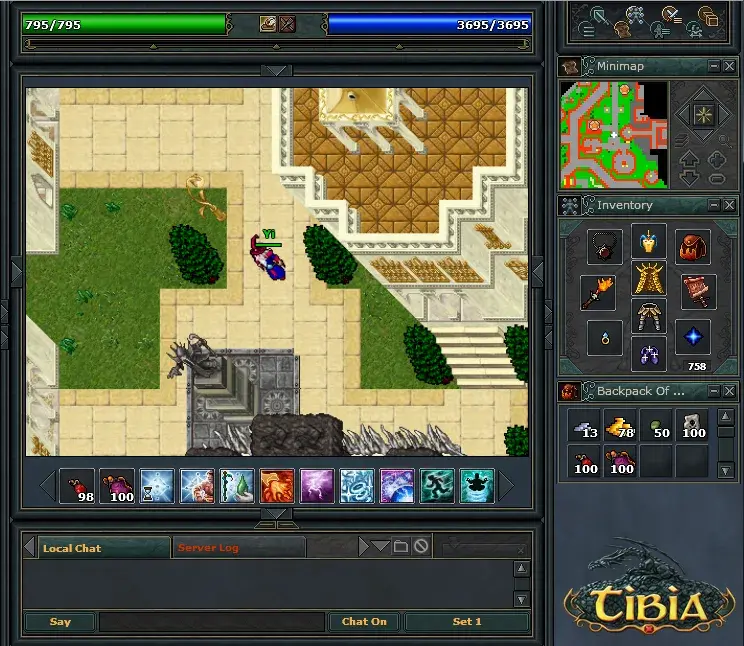
Welcome to Tibia, the classic PC MMORPG from CipSoft that's been around since 1995! Dive into a vast world where you'll choose a vocation like Knight, Mage, Paladin, or Archer, and embark on challenging quests, hunt monsters, and explore diverse landscapes. It’s a game that rewards dedication and strategic thinking, perfect for players who love deep progression and community interaction.
This guide is your essential companion for mastering Tibia. We’ll cover everything from character creation and choosing the right weapons to advanced hunting strategies. Get ready to tackle iconic quests like The Inquisition and the Desert Quest, and learn how to navigate the society system. Whether you're a fresh adventurer or a seasoned veteran, this guide will help you unlock your full potential and discover the rarest items, from helmets and armors to unique decorations.
**************************** 1. WHAT IS TIBIA? ******************************
Choose your Tibia world and understand Premium Account benefits like new areas, spells, and faster recovery. Learn about PvP vs non-PvP servers.
- 1There are fifteen worlds (servers) to choose from in Tibia.
- 2You can play as a Free Account or purchase a Premium Account (PA).
- 3All fifteen worlds have the same outlook, differing only in player population and player-to-player prices.
- 4Antica: The oldest server, located in Germany, is populated by high-level players and can be dangerous for new players due to PKs (Player Killers).
- 5Nova: The second server opened, also in Germany, is a power gaming world with a high player count, similar to Antica.
- 6Premia: Recommended for Premium Account holders, it has fewer players, who are generally nicer but more dangerous due to PA privileges.
- 7Amera: Located to serve players nearer America, Australia, and Asia, it is a quickly growing world.
- 8Libera: The second server located in America, with no special characteristics.
- 9Secura: The first non-PvP server (located in Germany), where attacking other players is impossible, and rune fields (poison/fire/energy fields) have a shorter duration and cannot harm other players or yourself.
- 10Lunara: The fifth server located in Germany, with no special characteristics.
- 11Eternia: The sixth server located in Germany, with no special characteristics.
- 12Trimera: The third server located in America, with no special characteristics.
- 13Calmera: The fourth server located in America and the second non-PvP server, where attacking other players is impossible.
- 14Danubia: The seventh server located in Germany, with no special characteristics.
- 15Rubera: The fifth server located in America, with no special characteristics.
- 16Isara: The eighth server located in Germany, with no special characteristics.
- 17Julera: The sixth server located in America, with no special characteristics.
- 18Valoria: The ninth server located in Germany, with no special characteristics.
- 19Hiberna: The seventh server located in America, with no special characteristics.
- 20Solera: The eighth server located in America, with no special characteristics.
- 21Titania: The tenth server located in Germany, with no special characteristics.
- 22A Premium Account (PA) applies to your WHOLE account, not just one character.
- 23PA privileges include access to Edron, Darashia, and Cormaya with new monsters and safer hunting places.
- 24PA grants access to new powerful spells for all vocations.
- 25PA allows for a purchasable title (Promotion) that speeds up health and/or mana recovery.
- 26PA enables creating your own guild, renting a house/guild house, and recovering health/mana by sleeping in beds while logged off.
- 27PA allows travel by ships, which is faster than walking.
- 28PA enhances gameplay significantly, especially for mages with faster rune creation and for power players with faster leveling.
- 29Extremely powerful monsters like behemoths and demons are exclusive to Premium Areas.
- 30Tibia is still enjoyable without a Premium Account.
- 31Servers are separated into PvP (Player versus Player) and non-PvP types.
- 32On PvP servers, you can attack and be attacked by other players anywhere, anytime.
- 33PvP servers allow for tournaments, events, and the ability to retaliate against annoying players or thieves.
- 34On non-PvP servers, attacking other players is not possible.
- 35Field spells last much longer on PvP servers.
- Consider your preferred playstyle when choosing between PvP and non-PvP servers.
- New players may find non-PvP servers or less crowded PvP servers more welcoming.
- A Premium Account significantly enhances the Tibia experience, offering access to more content and faster progression.
******* 2. NEWBIE GUIDE AND KNOWLEDGE ABOUT NEWBIE ISLAND, ROOKGAARD ********
Learn the essential Tibia controls for Rookgaard! This guide covers walking, using items, examining, talking, checking equipment, skills, battle, map, looting, and picking up items.
Hey there! Welcome to Tibia. Before you even think about leaving Rookgaard, let's get you comfortable with the basics. Think of this as your quick-start guide to not bumping into walls or accidentally attacking your friends. We'll cover all the essential controls you'll need to get around and interact with the world.
IMPORTANT NOTE: When you first start, Tibia uses 'Classic Controls' by default. If you find yourself confused by right-clicking to get menus, you can turn this off. If you do keep Classic Controls on, remember that holding CTRL while right-clicking will bring up that same menu. For most of this guide, I'll assume you're using the default, easier-to-understand right-click menu.
WALKING
This one's pretty straightforward. To move your character, just LEFT click on the spot you want them to go. Want to go across the whole map? You can even LEFT click on the MAP screen itself, and your character will start walking there. If you want to zoom in or out on the map, that's a simple RIGHT click on the map.
USING ITEMS
Got a potion, a rope, or maybe a fishing rod? To use any item, just RIGHT click on it. If you see a little white cross appear after clicking, it means you need to use that item *on* something else. For things like ladders, don't click the ladder itself or the top rung; instead, RIGHT click the 'square' or tile the ladder is standing on. Stairs are even simpler – just walk up to them!
EXAMINING
Curious about that weapon's stats or how much that item weighs? You can find out by LEFT clicking AND RIGHT clicking on an object, character, or even the landscape. This is super handy for checking defenses, attack power, and item weights.
TALKING
To chat with NPCs (Non-Playable Characters), type "Hi" or "Hello" into the text box at the bottom of your screen and press ENTER. Most NPCs will start a conversation. Sometimes, you'll need to be a bit more specific, like typing "Hello, [NPC Name]".
CHECKING EQUIPMENT, SKILLS, BATTLE SCREEN and MAP
- Equipment: Your gear shows up on the right side of your screen. You can drag and drop items into slots for your HEAD, NECK, BACK (backpack), LEFTHAND, RIGHTHAND, FINGER (ring), LEGS, FEET (boots), and an EXTRA SLOT for things like ammo.
- Skills: Click the 'SKILLS' button to open a window showing your experience points and skill levels. Skills like weapon proficiency or shielding increase as you use them or take damage (though nowadays, you often need to deal damage too). Fishing skill goes up by using a fishing rod (RIGHT click the rod, then LEFT click the water).
- Battle Screen: Hit the 'BATTLE' button to see nearby players and monsters. LEFT click a target here to attack. If you prefer not to use the Battle Window, you can always RIGHT click your target directly.
- Map: The map is in the top-right corner, with you as a white cross. Use the magnifying glass buttons to zoom in/out. The arrows let you view floors above or below. The star lets you move the map view around, and clicking its center resets it to your current location. The map will automatically update if you move.
BAG/BACKPACK
To open your backpack (if you have one), RIGHT click it on your equipment screen. It'll pop open just below your gear. If you open other containers, like a chest or another bag on the ground, they'll open relative to where you clicked. You can close any open window by RIGHT clicking the item again, walking away from it, or clicking the 'X' on the window.
LOOTING
After you defeat a monster, its body will stick around for a bit before decaying. While the corpse is in its first or second stage of decay, you can RIGHT click it to open it up and see what loot it dropped.
PICKING UP ITEMS
Once you've opened a bag or a monster's corpse, you can grab items. To pick something up, LEFT click it, hold the mouse button down, and DRAG it to an empty slot in your inventory or backpack. It'll usually go into the top-left slot first. Be aware that you can't pick up everything – some items are too heavy! If you can't pick something up, you might see a message like "Object is too heavy." This means your 'Capacity' is full, and you'll need to drop some items to make space.
DRAGGING/MOVING OBJECTS
This works just like picking up items. LEFT click an object, hold the button, and DRAG it to a new spot. Your character will move to it and push it. Lighter items like bags or weapons can be moved almost anywhere you can see (as long as there isn't a wall in the way). Heavier things, like big monster corpses or tables, can only be moved one tile at a time. Moving other players or monsters takes a moment, but moving items is instant.
SIDESTEPPING
Sidestepping lets you move diagonally (like / or \). You do this by LEFT clicking, holding, and dragging your character in the desired diagonal direction (northeast, northwest, southeast, or southwest). If you hold it for a moment, your character will move there. This is useful for squeezing through tight spots between objects or other players.
******************* 3. BASIC INFO ABOUT MAINLAND, TIBIA *********************
Learn about Tibia's mainland cities, depots for safe item storage and trading, and an overview of the four main vocations: Knight, Paladin, Sorcerer, and Druid, including their stats and pros/cons.
This section provides essential information about Tibia's mainland, covering depots, safe trading, and an overview of the four vocations.
3. A) Depots and Safe Trading
The 7 main cities in Tibia each feature a temple and a depot. Depots are Protection Zones (PZ) where you cannot be attacked, functioning like a postal office. You can store items in brown boxes within depot slots, which are secure. Depots also facilitate trading between players. To trade:
- Classic Controls: Hold CTRL and RIGHT-click the item you wish to trade.
- Modern Controls: RIGHT-click the item.
Select "TRADE WITH..." and click on the desired player. Both players must offer items and accept the trade for it to complete.
3. B) The 4 Vocations
This section offers a general overview of the four vocations: Knight, Paladin, Sorcerer, and Druid. It details their level-up stats, HP/mana regeneration, general pros and cons, and basic fighting styles. All vocations can purchase a Promotion for 20,000 gold pieces (gps) from the King of Thais or Queen of Carlin, provided they have a Prestige Award (PA).
Stats Gained Per Level Up:
| Vocation | Health | Mana | Capacity |
|---|---|---|---|
| Newbie | 05 | 05 | 10 |
| Knight | 15 | 05 | 25 |
| Paladin | 10 | 15 | 20 |
| Sorcerer | 05 | 30 | 10 |
| Druid | 05 | 30 | 10 |
Note: The sum of Health, Mana, and Capacity gained per level is 45.
HP/Mana Regeneration (per point, after eating food):
| Vocation | Health | Mana |
|---|---|---|
| Newbie | 6s | ?? |
| Knight | 6s** | 12s |
| Paladin | 8s* | 8s* |
| Sorcerer | 12s | 6s** |
| Druid | 12s | 6s** |
(* Becomes 1 point per 6 seconds when Promoted. ** Becomes 1 point per 4 seconds when Promoted. Xs = 1 point per X seconds.)
Knight:
Knights excel in melee combat, with rapid skill progression in melee weapons and shielding. They gain significant Health and Capacity but have low Mana, which is less of an issue due to their limited spells. Knights regenerate health faster after eating but have slow mana regeneration. Promoted to Elite Knights, they gain even faster health regeneration and can learn the "Challenge" spell, which draws all enemies' aggression.
Pros:
- No ammunition required for melee weapons.
- High defense reduces incoming damage, allowing them to block multiple monsters.
- High Capacity allows carrying substantial loot.
- High defense makes them difficult for other players to kill.
Cons:
- Require expensive armor and strong weapons; losing equipment is a significant setback.
- Must stay in close combat, limiting solo hunting of progressively stronger monsters without Ultimate Healing (UH) runes.
- Need Magic Level 4 to effectively use Ultimate Healing runes, which must be purchased from other players.
- Often become blockers due to high defense and health, with attack power insufficient for easily soloing powerful monsters compared to Paladins and Mages.
Fighting:
A Knight's strategy depends on Attack Power, Shield/Armor, Level, and the use of Instant Healing (IH) or Ultimate Healing (UH) runes. High attack power allows for quick kills. A high level and shield improve defense and speed, aiding in fleeing from PKs or powerful monsters. IH/UH runes increase survivability.
Overall:
The Knight is a good choice for beginners, as their fighting style is similar to the Newbie Island experience: approach enemies and attack.
************* 4. THE 7 MAIN CITIES OF MAINLAND (IN A NUTSHELL) **************
Learn about Tibia's main cities like Thais and Kazordoon, including their history, dangers, and nearby hunting grounds.
- 1Thais: The first town established in Tibia, located southwest of the Mainland center, between two rivers. It's home to King Tibianus and serves as Tibia's population center. Thais offers all basic shops and guilds for all vocations, with a ship connecting to Carlin, Ab'Dendriel, and Edron. However, on the Antica server, Thais is extremely dangerous for new players due to a high chance of being player-killed (PK'ed) and encountering high-level enemies. Survival often depends on intelligence, luck, high level, or having powerful friends. It is not recommended for newbies unless they wish to learn through harsh experiences.
- 2Kazordoon: Located far from Thais, in the very center of the Mainland, northeast of Mount Sternum and to the left of the Desert. Its entrance is a hidden staircase inside a mountain called the Big Old One, requiring a rope. Kazordoon has 8 subterranean and 6 above-ground floors, featuring all necessary shops, guild shops for knights and sorcerers, a fishing pond, training and resting areas, a large tavern, the Mines, and the Prison (which requires a Key).
Hunting Grounds Near/In Thais:
- Sewers: Contains only rats, suitable for newbies. Entrances are in the center of the X-roads and scattered around Thais.
- Trolls' Cave: Found southeast from the eastern town exit, hidden behind a loose stone pile among rocks. Contains mostly trolls and is not too dangerous besides potential PKs.
- Forest: North of Thais, with snakes, wolves, and bears. Be cautious near Mount Sternum to avoid cyclopses.
- King's Castle Basement: Accessed through King Tibianus' Castle's basement in northwestern Thais. Contains beholders and various orcs.
- Troll Hole: Two entrances exist: one west of Alatar's Lake (north of the northern town exit) and another in the swamp east of Alatar's Lake. Contains rats, trolls, and easy monsters, with cyclopses and harder creatures on lower levels.
- Mount Sternum: Entrances are east of Alatar's Lake and northwest of the bridge where King Tibianus' land ends. Filled with cyclopses. Historically, a Giant Spider was present on the second floor, and a house full of ghouls can be found deep within.
Hunting Areas Near/In Kazordoon:
- Dwarven Mines: Enlarged mines with new creatures like rotworms and poison spiders. The ground is sticky, slowing movement. Upper floors have normal dwarves, rotworms, spiders, and poison spiders, suitable for new players. Lower floors contain dwarf soldiers and guards, recommended only for experienced players, preferably in groups.
- Dwarven Prison: The prison of Kazordoon, with locked doors containing dangerous criminals. It houses various dwarves, all minotaurs except guards, most orcs except leaders, and some cyclopses.
- The source of this information is based on the Antica server and the author's personal experience, and Tibia can change rapidly. Information may be inaccurate or server-dependent.
- It is recommended for new players to stay in a town for safety.
- Smaller towns exist in Tibia but do not offer citizenship, depots, or temples.
- Familiarize yourself with common landmarks like Dwarf Bridge or Plains of Havoc for navigation.
- Consider visiting other towns like Carlin, Kazordoon, Ab'Dendriel, Edron, and Darashia (for Premium Account players) if Thais seems too dangerous.
Similar guides you might like


100% Human-Written. AI Fact-Checked. Community Verified. Learn how AntMag verifies content