Welcome to Dance Dance Revolution, Konami's rhythm game that puts your reflexes and sense of rhythm to the ultimate test! Since its release in 1998 on PC and PlayStation, DDR has challenged players to hit arrow prompts in time with the music, either solo or against friends. It's a game that's easy to pick up but offers incredible depth for those who want to master every step and conquer the dance floor.
This guide is here to help you navigate the challenging tracks and master every step. We'll cover advanced techniques, character overviews, and survival tips to help you achieve the highest scores. Whether you're a beginner just starting out or an expert looking to refine your skills, this guide will provide strategies for the most demanding songs and help you achieve top performance.
2A. LEARNING THE BASICS WITH GAME MODE
Master Dance Dance Revolution's standard Game Mode! Learn about panel styles, difficulty levels (Beginner to Oni), Groove Radar, and arrow options like Speed, Appearance, and Modify.
This section covers the standard Game Mode in Dance Dance Revolution, ideal for newcomers before tackling more complex modes like Quest Mode.
Game Mode Setup:
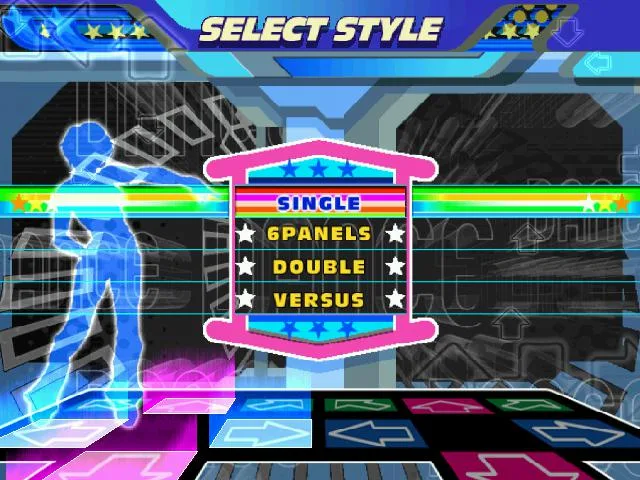
- Select Style:
- 4 PANELS: Standard gameplay with one dance pad per player.
- 8 PANELS: Each player uses two pads. This is a one-player mode on PS2 but can be played with two players on other consoles. Note that song step charts differ from 4 Panels mode.
- Setup Players Screen:
- Press 'A' to join as additional players.
- Use 'X' and 'Y' to select characters.
- Use Up and Down to choose the difficulty level.
Difficulty Levels:
- BEGINNER: Very easy, suitable for absolute beginners. Not recommended for skill improvement.
- BASIC: Easiest normal difficulty (2-5 feet). Steps are mostly on the beat.
- DIFFICULT: Moderate difficulty (4-7 feet). Steps follow the music more closely.
- EXPERT: High difficulty (6-9 feet). Steps closely match the song or are significantly challenging.
- ONI: An alternate, often harder, Expert chart (true 10-footers). Some Oni charts can be easier than their Expert counterparts.
Select Music Screen:
- Use Left and Right to switch songs.
- Up and Down can change difficulty without returning to the previous screen.
- Groove Radar: A graphical representation of song difficulty across five attributes:
- STREAM: Total number of steps.
- VOLTAGE: Density of steps within a given time.
- AIR: Number of double steps (jumps).
- FREEZE: Number and duration of Freeze Arrows.
- CHAOS: Number of non-standard steps (not quarters/eighths) or steps requiring turns.
- Press 'A' to confirm song and difficulty.
- Select 'Random' to let the game choose.
- Song Ordering:
- Default Order: Standard logical order.
- ABC Order: Songs organized alphabetically in folders.
- BPM Order: Songs sorted by maximum Beats Per Minute (fastest to slowest).
- Artist Order: Songs sorted alphabetically by artist name.
Arrow Options (Hold 'A' when selecting a song):
- SPEED: Adjusts arrow scroll speed (0.5x to 8x) to improve readability.
- BOOST: Arrows gradually speed up as they approach the step zone.
- APPEARANCE:
- Visible: Default.
- Hidden: Arrows vanish halfway up.
- Sudden: Arrows appear halfway up.
- Phantom: Arrows appear very briefly halfway up.
- Stealth: Arrows are completely invisible.
- TURN:
- Off: Default.
- Mirror: Rotates arrows 180 degrees.
- Left: Rotates arrows 90 degrees left.
- Right: Rotates arrows 90 degrees right.
- Shuffle: Reverses positions of two random sets of arrows.
- OTHER:
- Off: Default.
- Flat: All arrows are the same color.
- Solo: Different colors for different note types.
- Dark: Removes the step zone from the screen.
- Help: Certain arrows glow yellow to restore more dance gauge.
- MODIFY:
- Off: Default.
- Cut: Removes non-quarter notes.
- LR-only: Converts all steps to left or right arrows.
- All jump: Converts every pair of steps into a jump.
- All freeze: Converts every step into a freeze arrow.
- No jump: Removes all jump steps.
- No freeze: Removes all freeze steps.
- REVERSE: Arrows scroll from top to bottom.
Gameplay: Step on arrows as they reach the step zone. Accuracy is rated with 'PERFECT' being the highest.
2B. JESSE'S ASSORTED DANCING TIPS
Master Dance Dance Revolution with Jesse's assorted tips! Learn about dance pads, stepping techniques, hydration, and avoiding the center for better performance.
Now you know how to play. Time to consider other important stuff. Like, uh... pads! Unfortunately, there aren't exactly a lot of choices for the 360 yet. Your best choice is the one that comes bundled with the game; do NOT get any Mad Catz crap or anything like that. Trust me. If you'd like something sturdier, sorry, you're out of luck for now unless you're up to the task of building yourself a pad... and considering my lacking technical knowledge, I can't really help you there. Sorry again.
Pay attention to the beat, especially in early stages where steps tend to follow the beat exclusively.
Try to step with the balls of your feet. Not your heels. It's a good habit to get into. Stepping with your heels can make your ankles hurt, something just about anyone who's played DDR has experienced. That was really my biggest problem getting into the game, but don't give up, you'll get used to it and learn to step in a more ankle-friendly way soon enough.
Stay hydrated! DDR is exercise, and like any other kind of exercise, that's important. Water is good. So is fruit juice. Really, any cool beverage will do... so, like, don't go drinking a pot of hot coffee on the dancefloor. That's just stupid.
Try to return your feet to the center as rarely as possible. It may seem perfectly acceptable in early songs, but as you get into the harder stuff, you'll face long streams and other rapid-fire steps that don't really give you the opportunity to return to the center. Best to get used to staying away from there now then, eh?
3. FRQUENTLY ASKED QUESTIONS
Q: What is Dance Dance Revolution UNIVERSE?
A: Why, it's the first installment of Konami's popular Dance Dance Revolution series to come to the Xbox 360!
Q: How many songs are there in this mix?
A: 58 by default, and 15 more unlockable. Add 10 more if you're gonna download the "Megapack" from Xbox Live.
Q: Can you rip your own songs and play them on this game?
A: Everyone always asks that when a new DDR comes out. The answer is no, and I doubt they'll ever add that feature. And if they do, believe me, you'll hear all about it... so please, for the love of all that is holy, STOP ASKING!
Q: Why aren't there more "classic" DDR tunes in here? Why all this new crap?
A: I personally prefer getting a whole bunch of new tunes. Konami of Hawaii is trying to differentiate the Ultramix/Universe series from traditional DDR, so there's more new material and less traditional DDR stuff here. But they did finally revive HOT LIMIT for its first US appearance ever, so you can at least take comfort in that...
Q: Are there any ten-footers in the game?
A: Only one stepchart has been given an official ten-footer rating: Love Me Do (The Acolyte's Mix) Expert Doubles. However, the Oni charts aren't given ratings in this game for some reason, and four of those – Grandolin, Return of the Toe Jam, Tsugaru (OR-IF-IS Mix), and MAXIMIZER – would surely be rated a 10 if Oni charts were actually rated.
Q: Quest Mode sucks! Is there any other way to unlock songs?
A: Sadly, no. At least not that we know of. There might be a special unlock code, like some of the Ultramixes had, but if there is it hasn't been discovered yet.
Q: What the hell? I cleared all the Paramount challenges but PARANOIA EVOLUTION isn't unlocked!
A: Huge mistake in the achievements, my friend. That song is unlocked through the dreaded Quest Mode, just like all the rest.
Q: What's the deal with beatmania/pop'n music/GuitarFreaks/drummania?
A: These are some other popular Bemani series, and quite a few songs from those games have made the leap over to DDR. beatmania is another popular rhythm game series (popular in Japan, at least), classified as a "DJ simulator," in which you have a set of keys and a turntable to "scratch." Using those, you actually "play" a variety of songs... so if you're crap at the game, the songs sound like crap too. It's cool. pop'n music is sort of like a more cartoony version of beatmania, with big colored buttons instead of a keypad, that mainly features happy songs and tunes from popular anime. GuitarFreaks and drummania are games in which you play songs with a guitar and a set of drums, respectively. Several songs into the series, Konami got the bright idea to combine the two games, giving them identical songlists and allowing the machines to link up. And you thought Rock Band was such a totally original idea...
Q: (Insert song here) was in (insert game here) first, you moron!
A: That's not a question. Anyway, while I consider my knowledge of Bemani to be relatively thorough, and I checked and double-checked this stuff, I'm not perfect by any means. Correct me if you see something wrong... but please, be a little nicer than that! :D
Q: What's with those genres you have listed? My gerbil knows more about music than you!
A: Uh... good for him? I'll be honest, as much as I love music, I'm totally inept when it comes to categorizing it. I tried to narrow these down through research as much as I could, but there's no doubt in my mind that I screwed some of these up. Again, correct me if you know more than me, preferably without any unfavorable comparisons to your pet rodents...
If you've got a question for me concerning this game, go ahead and email me at crazyperson90@gmail.com! Just, you know, make sure I haven't already answered it somewhere in this guide, please. Don't be lazy. I hate laziness.
4. LICENSED SONGS, PART ONE
The first bunch of licensed songs seem to be Universe's big-name licenses, featuring artists that might actually be known to the general public. Of course the general public is mostly idiots, sooo... yeah. One notable trend is that most of these songs are pretty damn slow; "Slam" is the only song that reaches a fairly brisk pace.
4A. Don't Play Nice - Verbalicious
Dance Dance Revolution's Don't Play Nice by Verbalicious is a tough Hip-Hop Expert chart with 318 steps and 82 jumps. Learn more at AntMag.
About The Artist: Verbalicious is Natalia Keery-Fisher, a British musician, actress, and MC. She appeared on "All About Me" and "The Archers." Her music career is largely defined by this 2005 hit.
Song Details:
- BPM: 105
- Genre: Hip-Hop
- Song Type: License
- Bemani Debut: Brand New!
Chart Details:
- BEGINNER: 78 Steps, 1 Jump, 0 Freezes
- BASIC: 118 Steps, 18 Jumps, 1 Freeze
- DIFFICULT: 209 Steps, 43 Jumps, 18 Freezes
- EXPERT: 318 Steps, 82 Jumps, 68 Freezes
Expert Notes: This is considered one of the toughest Hip-Hop songs in Dance Dance Revolution. It features extensive stream sections and many small sixteenth note clusters that often follow the lyrics, along with 82 jumps. While initially difficult, the chart can become enjoyable once mastered.
4B. Everytime We Touch (Radio Mix) - Cascada
Dance Dance Revolution guide for Cascada's "Everytime We Touch (Radio Mix)". Details BPM, chart stats, and Expert notes.
- 1Beginner difficulty features 120 steps and 2 jumps.
- 2Basic difficulty has 131 steps, 4 jumps, and 40 freezes.
- 3Difficult difficulty requires 227 steps, 18 jumps, and 19 freezes.
- 4Expert difficulty has 301 steps, 27 jumps, and 32 freezes.
Expert Notes: Be alert, the steps start quickly on this one. The song itself is mostly simple medium-length streams, with a crossover or two. The one trick that might trip you up is the placement of a few three-note sixteenth clusters, thrown in right after jumps.
About The Artist: Cascada is a German Eurodance act consisting of Natalie Horler, DJ Manian, and Yann Pfeiffer. This song, released in 2005, is generally considered to be Natalie Horler's biggest hit.
Miscellany: This song has a special music video, which nullifies the dancing characters. The chorus is borrowed from another song of the same name, released by Maggie Reilly in 1992.
- Focus on the three-note sixteenth clusters that appear after jumps on Expert difficulty.
- Practice medium-length streams to build stamina.
- Be prepared for a quick start on the Expert chart.
Similar guides you might like



100% Human-Written. AI Fact-Checked. Community Verified. Learn how AntMag verifies content